MegaRid: Inspiration Maps
News Update
Loading...
Tampilkan postingan dengan label Inspiration Maps. Tampilkan semua postingan

Selasa, 21 Juli 2015

Inspiration Maps Updated with iPhone Support and More

Inspiration Maps displayed on iPhone 6

Inspiration Maps iconThe mind mapping and outlining app Inspiration Maps, which was previously only available on the iPad, is now available on the iPhone as well. The app is a valuable tool to help students organize their ideas and start the writing process. Users can drag text boxes around the screen to easily produce webs of ideas. Inspiration Maps is particularly helpful when writing about complex topics that require a well planned and organized essay. Inspiration Maps can be also be helpful when beginning an essay to visualize the structure that the written piece will take.

With the larger screen iPhone 6 and iPhone 6 plus in makes sense to bring the app to the iPhone. If you are concerned about not having enough room to effectively use the app on your iPhone, a free version is available here.

The update also makes in easier to select multiple text boxes or images at the same time. Now users can press and hold on the screen in order to lasso a group of images.

The updated app is available for $10 is the App Store. Click here to download the app. Click read more below to view more screenshots of Inspiration Maps for iPhone.


graphic highlighting brainstorming

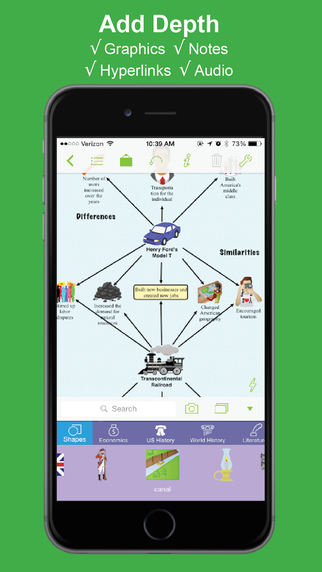
screenshot showing ability to add graphics, notes, hyperlinks, and audio

screenshot showing the ability to flip between web and outline view

Selasa, 06 Agustus 2013

Inspiration Maps for iPad: Mind Mapping on the iPad

Inspiration Maps for iPad: Mind Mapping on the iPad


Inspiration Maps is an iPad app that allows you to visually organize information. Inspiration Maps makes it easy to create clear mind maps that can help organize information for an essay or walk a student through a multi-step science experiment. The app comes with number of great looking templates for all different subject areas. If none of the templates meet your needs you can create your own.

To start you can tap on any box or bubble and add text. You can also change the color and shape of the text boxes. To move an object you can simply drag it around the screen. Pretty much all aspects of your mind map are customization from arrow, to text box shape, to text style. Another handy feature is the ability to add images to your documents. These pictures can really add some life to your documents.

In addition to diagram mode there is outline mode which is a text document. The document can include different bullets and numbered lists to help with the writing process. Everything added to the outline mode will be added to appear in the diagram mode and vice versa.

Once you have finish you can export the diagram as a PDF or PNG for use in other apps. You can also send it via email or Dropboxs a Inspiration Maps document. Unfortunately, Inspiration Maps does not include built in text-to-speech but Speech Selection can be used if enabled via the iPad's settings. To learn how to turn on Speech Selection click here.

Click here to download Inspiration Maps for $9.99 from the App Store. The app was provided complimentary to reviewer. Click read more below to see more images of Inspiration Maps in action.


How To Use
  • Put the link on the
  • Generate Link box with http:// or https://
  • Use  CTRL + V  on keyboard to put the link.
  • Click Generate button to get encrypted link.
  • Click Copy URL button.
  • Done