MegaRid: iOS 7 accessibility
News Update
Loading...
Tampilkan postingan dengan label iOS 7 accessibility. Tampilkan semua postingan

Rabu, 06 November 2013

New in iOS 7 and Android KitKat: Customize Subtitles and Captioning

New in iOS 7 and Android KitKat: Customize Subtitles and Captioning


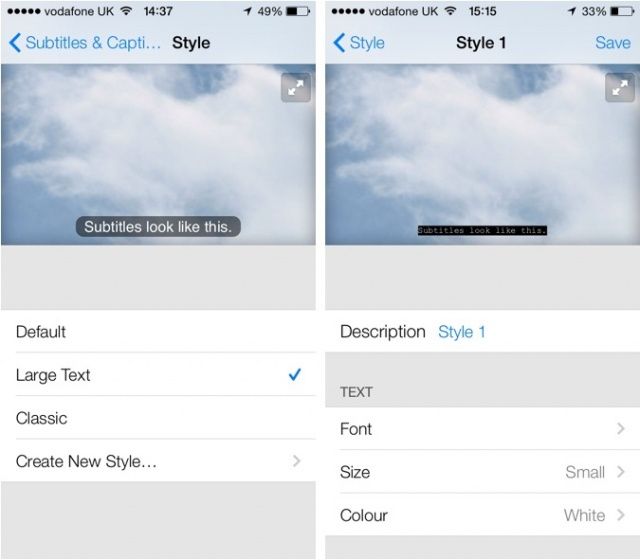
Both iOS 7 and Android KitKat include the ability to customize captions. Now both major mobile operating systems include the ability to customize movie and video subtitles system wide.. For iOS, the customization settings are under Settings > General > Accessibility > Subtitles & Captioning. From that menu you are able to change the appearance of subtitles of any video played through the default iOS video player. There are many options for customization including font, font size, font color, and background color. Android includes a similar feature that can also be accessed in the settings menu. These options are a welcome addition to mobile devices and can make subtitles much easier to see. It is great to see both Apple and Google improving accessibility on their mobile products.

Rabu, 09 Oktober 2013

New in iOS 7: System Wide Large Type


Apple’s new mobile operating system is out for iPhone, iPad, and iPod touch. iOS 7 includes many useful features for all users regardless of ability. One feature that can benefit people with visual impairments is system wide large font. With this feature enabled a user can select a larger font size for use in all compatible apps; the only caveat being that app developers must build in support for this feature. Once widely implemented by app developers this feature will make it easy to have the perfect text size in all your apps. Instead of selecting a preferred font size in each app users will be able to choose a font size once for all their compatible apps.

To enable larger type go to settings > general > accessibility > larger type.

Large text in NYTimes App

Jumat, 20 September 2013

New in iOS 7: Redeem iTunes Gift Cards with the Camera


Apple’s new mobile operating system for iPhone, iPad, and iPod Touch includes the ability to redeem iTunes gift cards with the camera instead of manually typing long codes. To redeem a gift card with the camera go to the iTunes Store, App Store, or iBooks Store and hit redeem at the bottom of the featured page. Then choose to redeem the gift card with the camera. You can use either the front facing or rear facing camera. To redeem the gift card just point the camera at the back of the gift card and the code is automatically redeemed. This new feature makes it possible for the blind and visually impaired to redeem gift cards without sighted assistance. Also, iOS 7 eliminates the need for sighted users to type in long and complicated codes. iOS 7 is available now for iPhone, iPad, and iPod Touch.

Kamis, 19 September 2013

New in iOS 7: Ask Siri to Turn on VoiceOver and other Accessibility Settings


iOS 7 is Apple’s new operating system for iPhone, iPad, and iPod Touch. iOS 7 includes a complete redesigned look and many new features. Siri in iOS 7 has learned some new tricks that can benefit users of VoiceOver and the other built in accessibility features that iOS offers. The feature allows you to ask Siri to turn on and off different accessibility settings using your voice. For example you can say, "turn on VoiceOver" and Siri will turn on VoiceOver in seconds. This feature will make iOS accessibility features easier to find and access. If a VoiceOver user is presented with an iOS device with VoiceOver turned off and triple click home disabled they could use this new feature to ask Siri to turn on VoiceOver. Besides accessibility settings Siri can also change other settings such as brightness, Bluetooth, and Wi-Fi. 

Rabu, 18 September 2013

New in iOS 7: Detailed Look at Switch Control


Apple’s newly released iOS 7 includes many new features and improvements. iOS 7 runs on the iPhone, iPad, and iPod Touch. Users will notice changes as soon as they boot up their iOS 7 device for the first time. But this release allows a group of users to use iOS for the first time. Just as VoiceOver allowed the blind and visually impaired to access the iPhone, Switch Control now allows switch users to navigate and use their iOS device. Switch users are users who are only able to activate a few large buttons and who don’t have the ability to interact with the complexities of a touch screen. For example, a quadriplegic may be able to activate switches mounted on their wheelchair with their head. Switches come in all different sizes and configurations but they give  users who are unable to interact with the touch screen the ability to control their devices. 

Switch Control for iOS is similar to other switch interfaces, a cursor scans around the screen and when a switch is activated the user is given options to interact with that object or button. For example, a cursor will scroll through all the app icons on your home screen and when the switch is activated it will open the selected app.

Click read more to learn below to learn more about Switch Control on iOS 7.

Switches
Example of a switch
Switch Control can be used with external switches connected to the device via Bluetooth. Switch control can also use the front facing FaceTime camera to recognize a user’s head movements. A third option allows the entire touch display of your iOS device to be used as a switch. Once you have a switch you can choose its action. A switch can control scanning by controlling the cursor or can be used to control system functions such as activating Siri, notification center, or the app switcher.

Settings

Switch Control is extremely customizable to fit the needs of many different users. The settings can be accessed by going to Settings > General > Accessibility > Switch Control. The speed at which the cursor moves can be change for faster navigation or easier use. The cursor can also be set to pause on the first item. There are also switch stabilization settings to increase or decrease hold duration and also to ignore repeat. Switch Control can also speech items to the user as the cursor highlights items. The cursor size and color is also customizable. Similar to Assistive Touch Switch Control allows saved gestures to be saved and activated later.

Using Switch Control

A cursor highlights the elements or groups of elements on the screen. Activating the switch selects the group and then pressing the switch again activates an element. This process allows users to select apps from the home screen, keys on the keyboard, and other buttons. A secondary menu can also be activated with options specific to that element. The menu includes options to tap the element, scroll, activate saved and pre-set gestures, activate device functions such as volume, and shortcuts to change Switch Control settings. On elements such as volume sliders you are also given the option to decrement and increment. The gesture menu gives you the option to flick, pan, pinch, tap and hold, drag, drag and hold, double tap, freehand, and access saved gestures. Amazingly, these gestures can be precisely controlled through one switch by following on screen options. For scrollable list you can activate the “scroll” submenu.

Switch Control Compatibility with Third Party Apps

As with most accessibility features, support for Switch Control with third party apps unpredictable. Luckily, VoiceOver has laid the ground work for Switch Control. As I understand, Switch Control and VoiceOver use the same accessibility elements. This an app that works with VoiceOver will work with Switch Control and vice versa. This makes app developer’s jobs much easier.

Wrap-Up

Switch Control is one of many great new accessibility features in iOS 7. Switch Control will allow a whole new group of people (switch users) access to the iPhone, iPad, or iPod Touch. Like all of Apple’s accessibility features Switch Control is available on all iOS 7 devices and works out-of-the-box.
Apple Releases iOS 7 With New Accessibility Features

Apple Releases iOS 7 With New Accessibility Features

Today Apple released iOS 7, a new version of the operating system for iPhone, iPad, and iPod Touch. iOS 7 includes a number of new features including a totally redesigned interface. iOS 7 also includes a number of new accessibility features that will benefit users with disabilities. The operating system also builds on existing accessibility features such as Speak Selection, VoiceOver, Guided Access, Assistive Touch, and Zoom. Click on a link to learn more about the corresponding feature. It is exciting that Apple has continued its commitment to accessibility in every new iOS release. Among the new accessibility features are system wide large fonts, customizable captioning, Siri improvements, Switch Control, and more. All of these features are available to all iOS 7 users automatically. To learn more about these features as more information becomes available look for posts titled "new in iOS 7."

iOS 7 is available for iPhone 4 and newer, iPad 2 and newer, and the fifth generation iPod Touch. To download iOS 7 go to Settings > General > Software Update.

Selasa, 10 September 2013

The Touch ID Fingerprint Sensor on the New iPhone 5s Has Major Accessibility Implications


Today Apple announced the iPhone 5s with a fingerprint sensor dubbed Touch ID. Touch ID allows users to unlock their iPhone and purchase iTunes content using just their fingerprint. The Touch ID sensor is located under the home button. This feature allows all users to secure their iPhone without typing in a passcode each and every time. This will encourage more users to secure their phone and decrease frustration when they enter the passcode incorrectly.

While the new Touch ID sensor is not exclusively an accessibility feature it will have large implications for some disabled users. Blind and visually impaired users will be one group to benefit greatly. These users use the built in VoiceOver screen reader to navigate the iPhone. Without being able to see the screen typing in even a simple four digit passcode with VoiceOver may be time consuming compared to a sighted user typing in the same passcode. (Don't take this the wrong way, VoiceOver is a fantastic feature that gives blind and visually impaired users access to their devices. It just takes longer to enter information). With the new Touch ID sensor VoiceOver users will be able to almost instantly unlock their iPhone just as quickly as any other sighted user.

The Touch ID sensor will also benefit people with cognitive disabilities who are unable to remember a passcode, but still need to protect their device. People with cognitive disabilities can benefit greatly from various iPhone apps, but may not be able to remember a passcode to protect their device. Now with the Touch ID sensor cognitively impaired users can easily unlock their iPhone with their finger.  It eliminates the fear and possibility of forgetting your passcode.

The iPhone 5s will also include iOS 7 which includes new accessibility features. Click here to learn more about iOS 7 accessibility. Click read more below to view videos about the iPhone 5s.


Selasa, 03 September 2013

Apple Confirms September 10th iPhone Event

Apple Confirms September 10th iPhone Event


Apple has confirmed previous rumors that the next iPhone will be announced on September 10th at 10 am pacific time. Apple is widely expected to unveil two new iPhone models at the event; a cheaper plastic model and a new top of the line model. The higher end model is rumored to include a fingerprint sensor for unlocking the phone more quickly than a pass-code  Apple is also expected to provide further details and a launch date for their redesigned iOS 7. iOS 7 will be available on most current devices and will include new accessibility features. Unlikely to make an appearance at the event are new iPad models which are expected to be announced later in the year.

Be sure to check back here on Tuesday, September 10th for analysis of all of the day’s announcements and how they impact the world of accessibility.

Jumat, 14 Juni 2013

iOS 7 Accessibility Overview: What We Know Now

This year iOS accessibility did not get the prime-time attention that it did during last year's WWDC Keynote, but iOS 7 still includes many new accessibility features. When iOS 7 launches in the fall, users of all abilities will find beneficial features. iOS 7 is still in beta so Apple can always add or remove features before the final release to the public. Through the Apple Keynote and other sources a number of accessibility features have been detailed. These new features will improve on current accessibility features such as VoiceOver, Guided Access, Speech Selection, Assistive Touch, and Zoom. This post will be updated as new information becomes available on iOS 7 accessibility.

Click read more to learn about iOS 7 accessibility.

Customize Captioning

from CultofMac.com

iOS 7 will also allow users customization the font and size of subtitles. Currently the subtitles are small and can be hard to read particularly on the iPhone and iPod touch. In iOS 7 the font, size, and color of subtitles can be changed.

Use Camera to Redeem iTunes Gift Card

from iDownloadblog

One of the coolest features for the blind and visually impaired in iOS 7 is the ability to redeem iTunes gift cards using the devices camera. This will allow users who cannot read the small codes printed on the back of iTunes gift cards to redeem their gift cards easily without assistance. This feature originally debut on iTunes 11 on the Mac.

Siri Improvements


Along with updated Siri functionality Apple has added multiple high quality text-to-speech voices. The voices are both male and female and sound much better than the previous Siri voice. It is not clear is these new voices will be available for VoiceOver and Speak Selection or exclusive to Siri.

Switch Control

from AppAdvice.com

According to AppAdvice iOS 7 beta 2 also includes Switch Control. Little is known about the feature but the name suggests that iOS 7 will allow a user to control their device through switches. These switches are designed for people with physical disabilities who may only be able to activate one or two large switches. A separate post on MacRumors say that iOS 7 will allow users to control their device with head movements. From the screenshot it appears that head movement could be part of Switch Control and be used to activate a switch but it is unclear at this time. Below is a video of Switch Control.


New APIs to Help Developers Build More Accessible Apps

Last year in iOS 6 Apple included Guided Access which could put the device in a single app mode. Guided Access was targeted for users with autism. This year iOS 7 will add a Guided Access API for developers. This feature will allow developers to build apps that integrate deeply with Guided Access to give users more control of Guided Access.

iOS 7 is also reported to include new APIs to allow developers to detect blinking and smiling which could help disabled users control their device. It has also been reported on 9to5mac that Apple will include a text-to-speech API which would allow developers to easily integrate text-to-speech into their app.

iOS 7 is looking like a great release for all iOS users including users with disabilities. Apple is likely to change feature until iOS 7 is released to the public in the fall.

Minggu, 09 Juni 2013

Reminder: Apple to Preview "The Future of iOS and OS X" Tomorrow


Apple's World Wide Developer Conference (WWDC) starts Monday June 10th. At the event Apple will detail "the future of iOS and OS X." Apple is a leader in integrated accessibility with their VoiceOver screen reader and numerous other accessibility features such as Guided Access, Speak Selection, Zoom, and Assistive Touch. That being said Apple still needs to improve their accessibility features to remain a leader. New accessibility features have routinely been added to new versions of iOS. Last year, Apple added Guided Access along with other accessibility improvements. A new version of iOS is exciting not only because of the cool mainstream features but the lesser known, but no less important accessibility features that make the devices usable for so many. Make sure to visit The Assistive Technology Blog after the Keynote for all the iOS 7 and OS X accessibility news.

In the meantime check out my iOS 7 Wish List video below.


How To Use
  • Put the link on the
  • Generate Link box with http:// or https://
  • Use  CTRL + V  on keyboard to put the link.
  • Click Generate button to get encrypted link.
  • Click Copy URL button.
  • Done