MegaRid: OCR
News Update
Loading...
Tampilkan postingan dengan label OCR. Tampilkan semua postingan

Jumat, 20 September 2013

New in iOS 7: Redeem iTunes Gift Cards with the Camera


Apple’s new mobile operating system for iPhone, iPad, and iPod Touch includes the ability to redeem iTunes gift cards with the camera instead of manually typing long codes. To redeem a gift card with the camera go to the iTunes Store, App Store, or iBooks Store and hit redeem at the bottom of the featured page. Then choose to redeem the gift card with the camera. You can use either the front facing or rear facing camera. To redeem the gift card just point the camera at the back of the gift card and the code is automatically redeemed. This new feature makes it possible for the blind and visually impaired to redeem gift cards without sighted assistance. Also, iOS 7 eliminates the need for sighted users to type in long and complicated codes. iOS 7 is available now for iPhone, iPad, and iPod Touch.

Minggu, 30 Desember 2012

Favorite Assistive Technology Apps & Products of 2012


As 2012 comes to a close I decided to make a run down of my favorite assistive technology apps and products that I have been using this year. This list is in no particular order.

Click read more view the list.


The Sky WiFi Smartpen is easy to use and seamless. It has a built in recorder and camera that, when used with specialized paper, syncs audio and written notes in the cloud. To read the Sky WiFi Smartpen review click here.


iPad mini is a great tablet because of its size, app selection, and accessibility. The lower price point makes it even more compelling. Most of all iPad mini runs all the apps that the full size iPad does and has accessibility features second to none. Click here to read more about the iPad mini.


While iOS 6 many have been short on mainstream features it has several useful accessibility features including Guided Access, highlighting with Speak Selection, Siri improvements, and VoiceOver improvements. Click here to learn more about iOS 6.


This update included great new voice search feature that I found to be better and faster than Siri. Click here to learn more about the Google Search App for iOS.


This app has a really nice interface and good scan quality which made it my favorite scanning app of 2012. Click here to learn more.


Prizmo is hands down the best OCR app for iPhone that I have used. Just take a picture of a document and it will read it to you in a matter of seconds. Click here to download or learn more about Prizmo.


A great reader of Bookshare books that allows you to read your books portably without a computer. Bookshare is an online accessible library avalible to qualified people. Click here to download or learn more about Read2Go.


Kurzweil isn't new to 2012 but it is a program I use everday. It helps me tremendously and it deserves a spot on this list. Click here to learn more about Kurzweil 3000.


Good app for listening to Learning Ally Audio books. The free app is available for all iOS devices. I would like to see the app include new features such as background audio in 2013. Click here to learn more.


PaperPort Notes App Adds OCR Functionality


Nuance's PaperPort Notes app for iPad received a major update. The highlight of the update is the ability to take a picture of text to add the text to your notes. The Optical Charactor Recongition (OCR) feature is slower than other competing apps but is accurate. The improved cameras on the newest iPads allow OCR to work well. To learn about the other features of the free PaperPort Notes app click here. Click here to download the app.

Click read more below to view screenshots of PaperPort Notes.


Jumat, 30 November 2012

iTunes 11 Feature Helps Visually Impaired Redeem Gift Cards

iTunes 11 Feature Helps Visually Impaired Redeem Gift Cards


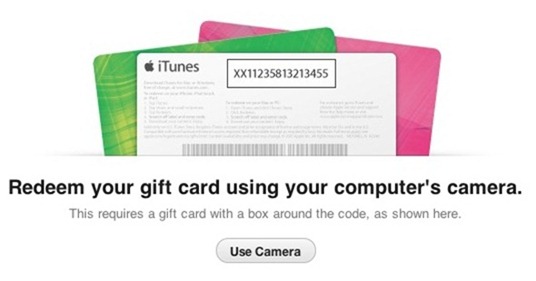
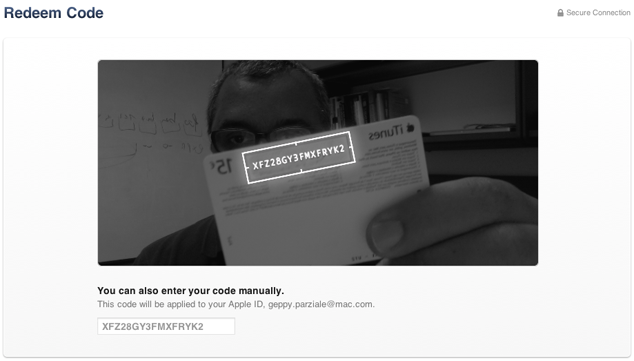
A feature in Apple's iTunes 11 allows you to scan a gift card code using your computer's camera. The feature is particularly intriguing for the blind, visually impaired and for dyslexics. While it may be inconvenient for most people to type the 16 digit code, it is impossible for users who are blind or visually impaired, and can be a struggle for some dyslexics. To use the feature position the gift card in front of the computer's camera. For people with visual impairments VoiceOver, Apple's built in screen reader on your Mac will help you frame the card in the picture. Then iTunes recognizes the code and credits the money to your iTunes account. This feature makes it possible for the blind and visually impaired to easily and independently redeem iTunes gift cards. Maybe this cool scanning feature will make its way to iOS in the near future.

Click read more below to view pictures of the scanning feature in action.


How To Use
  • Put the link on the
  • Generate Link box with http:// or https://
  • Use  CTRL + V  on keyboard to put the link.
  • Click Generate button to get encrypted link.
  • Click Copy URL button.
  • Done