MegaRid: assistive technology
News Update
Loading...
Tampilkan postingan dengan label assistive technology. Tampilkan semua postingan

Kamis, 13 Agustus 2015

AXS Map: Crowdsourced Accessibility Reviews of Businesses


AXS Map is an app available for iOS and Android that allows users to rank the accessibility of local businesses. Using the location of the device users can search for nearby businesses and rank the accessibility of the location in very basic terms. More detailed accessibility information and information for people with a wider range of disabilities would improve the app.

While accessibility standards established by the government are exact and technical, AXS Map uses a star rating system. For example, a businesses that is easily accessible to people with disabilities would earn a five star ranking. The app also allows users to rank a business based on the noise level, which can be helpful for people with hearing impairments, and by light which can be helpful for people with visual impairments.

I was recently involved in a "Mapathon" were a group of people used the app to map parts of the city. This experience helped me understand the value of the app, as some businesses had serious accessibility issues such as numerous steps with no ramps.

The data that is inputted through the app or the website can then be viewed by people interested in the accessibility of a business. For example, a person with a physical disability could check the app to make sure that a coffee shop had a ramp.

If the AXS Map platform becomes popular it could even prompt businesses with poor rating to make improvements.

While the concept behind AXS Map is good, the implementation is a little rough. The app is not intuitive to use and can be frustrating. However, it does work once you get familiar with the interface. The app also requires users to enter their email which could steer some users away.

To use AXS Map visit AXSMap.com or download the app for iOS and Android. Click here to download the app for iOS and click here to download the app for Android.

Selasa, 21 Juli 2015

Inspiration Maps Updated with iPhone Support and More

Inspiration Maps displayed on iPhone 6

Inspiration Maps iconThe mind mapping and outlining app Inspiration Maps, which was previously only available on the iPad, is now available on the iPhone as well. The app is a valuable tool to help students organize their ideas and start the writing process. Users can drag text boxes around the screen to easily produce webs of ideas. Inspiration Maps is particularly helpful when writing about complex topics that require a well planned and organized essay. Inspiration Maps can be also be helpful when beginning an essay to visualize the structure that the written piece will take.

With the larger screen iPhone 6 and iPhone 6 plus in makes sense to bring the app to the iPhone. If you are concerned about not having enough room to effectively use the app on your iPhone, a free version is available here.

The update also makes in easier to select multiple text boxes or images at the same time. Now users can press and hold on the screen in order to lasso a group of images.

The updated app is available for $10 is the App Store. Click here to download the app. Click read more below to view more screenshots of Inspiration Maps for iPhone.


graphic highlighting brainstorming

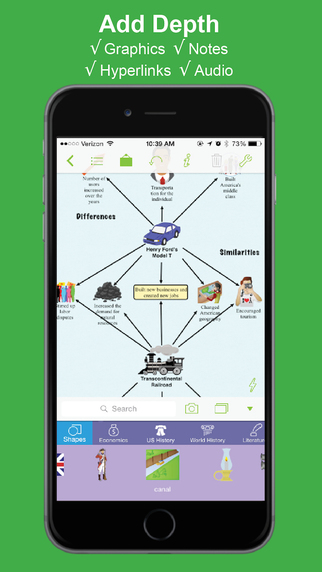
screenshot showing ability to add graphics, notes, hyperlinks, and audio

screenshot showing the ability to flip between web and outline view

Jumat, 03 Juli 2015

Bright Future for Apple Accessibility with Lisa P. Jackson in the Lead

Headshot of Jackson wearing red shirt

Apple recently updated the bio of Lisa P. Jackson to reflect her new role overseeing accessibility at Apple. This expands her previous responsibilities of overseeing environmental initiatives at Apple. Ms. Jackson's official title is now Vice President of Environment, Policy and Social Initiatives. Apple CEO Tim Cook has been vocal regarding his views of the importance of accessibility. This new management change, which puts a Vice President level executive in charge of accessibility for the first time, seemingly reaffirms Apple's long-standing commitment to accessibility.

Apple has been a leader in accessibility. Its products include superior accessibility features out of the box. Features such as VoiceOver, Speak Selection, Zoom, AssistiveTouch, and Switch Control give people with disabilities equal access to Apple products at no additional charge. From personal experience I can say that these features are truly life changing and positively impact many people.

Even considering Apple's past success there are areas for possible improvement. One example involves training sales people about the accessibility features. On recent trips to Apple Stores, I have had some experiences that are not consistent with Apple's commitment to accessibility. For example, the Apple Watch on display had its accessibility features disabled. While Apple likely wants to limit confusion for customers who do not use accessibility features, this does not promote equal access. Part of the magic of the Apple Store is being able to walk up to a shinny new product and try it out. With the accessibility features disabled, and the sales people unfamiliar with how to enable these features, users with disabilities don't have an opportunity to fully explore the product. Apple should be showing off these features, not hiding them. Apple would be doing a great service to its customers with disabilities to prepare its store employees to talk about accessibility features as well as they talk about other features.

Ms. Jackson has proven herself to be a very capable leader.  She has the ability to continue Apple's accessibility superiority and solve existing challenges. Her work on environmental initiatives has been very successful, propelling Apple towards the top of the technology industry in terms of sustainability. The future of Apple product accessibility seems bright, and I am excited to see what innovations come next.

To read Lisa Jackson's full bio from Apple click here. Photo credit: Apple.

Minggu, 28 Desember 2014

KNFB Reader App: Amazingly Fast and Accurate


The KNFB Reader is a text recognition app that is shockingly fast. Take a picture of a newspaper article or practically any printed text and within a couple of seconds the app will be reading the text back to you. A "couple of seconds" is no exaggeration, the KNFB Reader app is that fast. For people who are visually impaired or have difficulty reading, the KNFB Reader is perfect for accessing printed text.

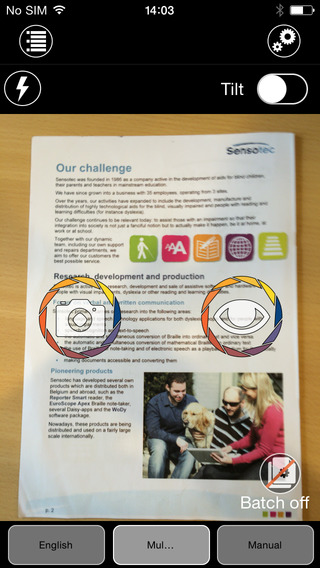
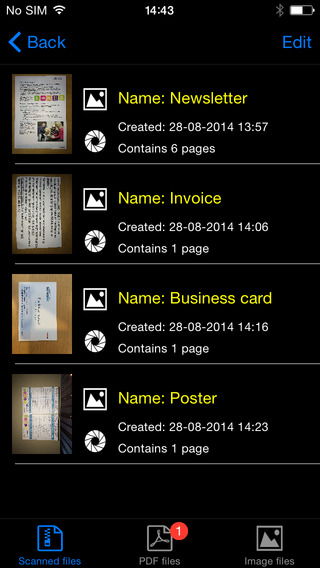
Once a document is properly framed, only one more step is necessary to start reading the document. Simply press the take picture button and within seconds the app will recognize the text within the document using optical character recognition (OCR) and begin reading it with text-to-speech. No need to crop or adjust the image, once the picture is taken the app does all the work. All recognition is done locally on the device so personal data is never transmitted over the internet.

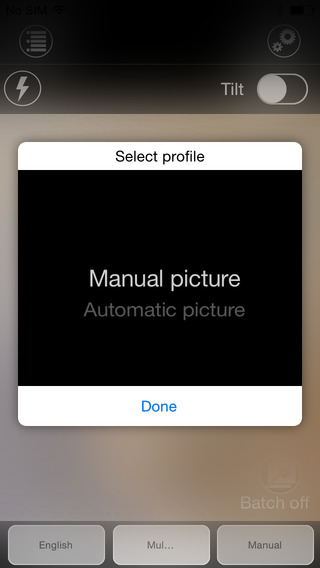
The KNFB Reader app has a number of features that help users capture images of text. For users who are blind and visually impaired the app offers a "field of view report" which offers spoken feedback to help frame the document in the view finder. This feature will let a users know how many corners of the document are within the field of view and if the document is tilted. In addition, the app offers automatic picture taking mode which will automatically snap a picture of a document when it is properly framed.  The app also includes the ability to capture multi-page documents with batch mode. The field of view feature worked well with loose paper documents, but I did not have success using the automatic capture feature with books.

In addition to using the device's built in camera to capture images, users can also import image based PDF documents and JPG files to be recognized with the app. For example, using the "open in" feature of Google Drive will allow a user to import an image to be recognized and read with KNFB Reader.

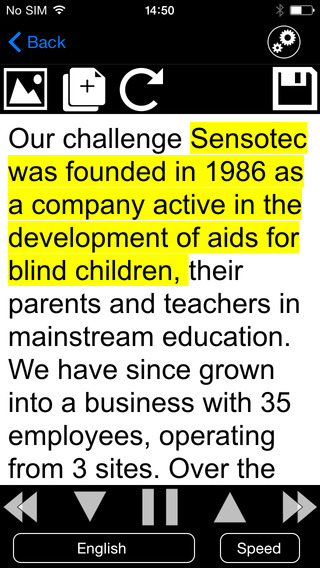
Text is can be highlighted word-by-word or line-by-line as it is being read aloud by the text-to-speech voice. Users can adjust the layout and appearance of the text and change the speaking rate of the text-to-speech voice. Only the default iOS text-to-speech voice is available, so users hoping to use another voice will have to export the text to another app. The built-in text reader also lacks the ability to highlight or annotate the document, so once again users looking for this functionality will need to export the text to a different app.

While the KNFB Reader app is faster and more accurate than competing products such as Prizmo, Prizmo does include some useful features that KNFB Reader does not. Prizmo, which is significantly less expensive, includes the ability to export PDF documents. This means a user can take a picture of a document, have the text recognized and any images on the page retained by Prizmo, so that it looks identical to the printed page. KNFB reader, by contrast strips away images, and only retains the printed text. If PDF export is an important feature to you, Prizmo may be a better option. Click here to learn more about Prizmo. 

If you are looking for a text recognition app with great speed and accuracy, I think you will be quite pleased. If The KNFB reader fits your budget, you won't be disappointed. KNFB Reader costs $100, to download the app from the App Store click here. It is compatible with the iPhone 4S and newer and the iPod touch fifth generation. Click read more below to view screen shots of the app.


Senin, 11 Agustus 2014

Indoor Navigation System Will Soon Guide Blind Passengers at SFO


Imagine how difficult it would be to navigate a bustling airport terminal as a person with a visual impairment. Navigating security, finding baggage check, and finding the correct gate all while trying to make a last minute flight is daunting for even the most seasoned travelers. San Francisco International Airport (SFO) will soon implement a system to help guide blind and visually impaired travelers from curb to gate. Starting with Terminal 2 this fall, the airport will install some 500 iBeacons for a trial. Current solutions such as GPS do not work well indoors because they are unable to provide precise location information, but beacons allow more precise locationa. When a user with the indoor navigation app walks by a beacon it communicates with the user's smartphone and transmits the location. With the location information sent from the beacon, the app can then guide users to restrooms, restaurants, boarding gates, baggage claims, and even charging stations. Initially the app will only run on iOS devices, but Android devices will likely follow. The system runs off Bluetooth technology which should have minimal impact on battery life. For blind users, points of interest and navigation instructions are read aloud using VoiceOver.

If the trial in Terminal 2 is successful, it is likely that the program will expand to more terminals and more airports. This system, powered by a company called indoo.rs, is a promising development for indoor navigation. In the near future, it is conceivable that similar systems will help people with visual impairments navigate shopping malls, schools, or hospitals. The technology will also benefit sighted users who have trouble finding locations in the vast terminal. If your traveling through SFO Terminal 2 this fall give it a try.

Kamis, 17 Juli 2014

Too Much Background Noise when Recording Lectures with Smart Phone or Table Built-in Microphone? Check Out the Ampridge MightMic


Mobile devices are convenient tools that students use to record classes and lectures, reporters use to record news conferences, and business people use to record meetings. Some use note taking apps like Notability, Remarks, or Livescribe+ to augment their notes with audio recordings. The benefits of recording the audio can be minimized by poor quality recordings from built-in microphones.

Built-in microphones tend to do a poor job of isolating sounds which results in background noise that makes the desired sounds difficult to hear, especially for people with hearing impairments.

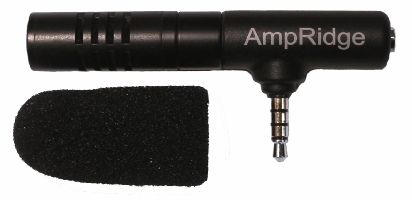
The AmpRidge MightyMic microphone plugs directly into the headphone jack of any smartphone, tablet, or computer that supports microphone input. It proves an alternative audio output jack so users can still plug in headphones while the microphone is plugged in. Its compact size makes it easy to use in class and makes in relatively discrete. The MightyMic microphone works well with an iPhone and is only slightly longer wider than the width of the phone. The microphone  even worked fine with my bulky iPhone case. Once plugged in you can angle the microphone towards the front of the room to capture the most important sounds. In my testing, the MightyMic microphone was on par with the built-in iPhone microphone for close range recording, but worked considerably better than the built-in microphone in a classroom or outdoor long range environment. The MightyMic microphone reduced background noise resulting in better sounding audio playback. If you frequently record classes, lectures, or meetings and are less than satisfied with your device's built-in microphone, the MightyMic mic is a good option to give your sound a boost. If you're looking for a big improvement in sound quality quality you may have to look towards more expensive options.

The Ampridge MightyMic retails for $70 on AmpRidge.com. Also included is a protective carrying pouch and foam protective cover.


Product was provide complimentary to reviewer for review


Senin, 30 Juni 2014

High-Tech Utensil Helps to Counteract Tremors and Stabilize Food

High-Tech Utensil Helps to Counteract Tremors and Stabilize Food


For many with tremors eating can be a daunting task. Each bite is a challenge because the tremors make it difficult to steady the food in order to eat. This can extremely frustrating in the privacy of one's own home and very embarrassing when eating in public. A company name Lift Labs has a solution, mechanical utensils that counteract tremors and steady food. Lift Labs claims that this technology can cancel out 70% of the tremor to reduce spills, making eating easier. The Liftware device runs on a built-in battery and starts working when it is lifted off of the table. The mechanical stabilizing technology in the utensil's handle steadies the food even with unsteady hands. Users can switch between a fork and spoon attachment depending on what they are eating. The attachments are interchangeable, making cleaning easier and allowing users to switch between a fork and spoon. Liftware sells for $295 on Lift Labs website. Click here to order. Liftware has the potential to increase independence for millions of people with tremors.


Click read more below to view more videos of Liftware in action.


Sabtu, 31 Mei 2014

Ginger Page for iPhone: Powerful Spelling and Grammar Correction


Ginger Software, the maker of the powerful spelling and contextual grammar checker "Ginger" has released an iPhone app called Ginger Page. Ginger's technology can correct mistakes that common spell checking software would not detect. Ginger does this by analyzing the context of the text being written. For example, if you are writing about drafting a school essay Ginger will suggest that you use "write" instead of "right." From my testing, Ginger also seems much better at suggesting and correcting punctuation than other editing software. Ginger Page can also read your writing back to you using text-to-speech, which can be a powerful proof reading tool, especially for those with dyslexia. Once you have completed your writing, you can share it by text message, email, or open it in another compatible app.

While the Ginger correction software is very good, the app has some notable omissions. Ginger Page is only available for iPhone which is perplexing for a writing focused app. The iPad's larger screen would make the writing experience much easier. Also, Ginger requires an internet connect to correct your writing. You can still type into the app without an internet connection, but no corrects will be offered. 

Since, Ginger Page is a free app its a no brainier to download it if you need extra spelling and grammar help. Click here to download Ginger Page. Watch the above video above to see Ginger Page in action and click read more below to view screenshots of the app.


Kamis, 08 Mei 2014

Google's Project Ara Smartphone has Tremendous Accessibility Potential


Google's futuristic modular smart phone has the potential to dramatically change how we think of electronics. The still unreleased phone call Project Ara has a interior metal structure with slots for different components to connect. For example, modular components could house a camera, battery, touch screen display, or speaker. These components snap into place making a relatively standard looking smartphone. Consumers could purchase components and assemble them to make a personalized smartphone. The phone allows consumers to exchange a component for extra battery power or a more powerful camera depending on the situation.

With such customizable hardware, the Ara phone could adapt to fit the needs of people with various disabilities. If users have a hearing impairment they could add a louder speaker component. Conversely, if a user is deaf there is no need to waste space with a speaker when the space could be used for something more useful. The possibilities are almost limitless. A blind user could possibly opt not to have a touch screen display in favor of a refreshable Braille display. Users with dexterity challenges could add a tactile keyboard.

While Project Ara sounds promising for people with disabilities, the implementation is key. Will third party hardware developers make specialized components for people with disabilities at an affordable price? Can Google successfully configure Android to work properly with any assistive add ons third parties make?  Project Ara phones won't be available for for many months, but the project offers some exciting possibilities.


Click read more below to learn more about Project Ara.


Sabtu, 08 Maret 2014

Any Developer Can Now Integrate Fleksy's Accessible Keyboard Into Their iOS App


Fleksy is an alternative keyboard for mobile devices including smartphones, tablets, and even smart watches. Fleksy uses predictive software that will guess which word you meant to type even if you mistype every letter. As long as your close to the right letters Fleksy will be able to correctly guess which word you meant to type. This means you don't even have to look at the keyboard. If Fleksy does make a mistake you can easily swipe through alternative suggestions.

Currently, Apple does not officially support third party keyboards to replace the default keyboard on iOS, but developers can get around this limitation by building an alternative keyboard into their app. Today, Fleksy made it easy for developers to built the Fleksy keyboard into their app. The Fleksy keyboard is now available for any iOS developer who wants to include it in their app. This announcement is very exciting because if developers get on board it will give iOS users the choice of which keyboard to use.

Having Fleksy integrated in apps is also a positive for blind and visually users. Fleksy works well with VoiceOver and because Fleksy is so good at predicting which word you are trying to type being able to see the keyboard is not as important. The Fleksy keyboard is much quicker and easier to type on then the default iOS keyboard especially for VoiceOver users.

Unlike Android were you can download Fleksy and use it will all of you favorite apps, each iOS developer will have to build in support for the keyboard. Hopefully, now that Fleksy is available for all iOS developer Fleksy will become ubiquitous on iOS. If you would like to see Fleksy integrated into one of your favorite apps you could contact the developer and ask for Fleksy integration.

To try out Fleksy download the app for iOS or Android. Fleksy is currently available in select apps such as Launch Center Pro. Click read more below to view images and videos of Fleksy.


iPhone Screenshot 2

iPhone Screenshot 3


Minggu, 23 Februari 2014

Launch Center Pro: Speed Up Common Actions on iOS Devices


blue icon with rocket ship in the middleLaunch Center Pro is an app for iPhone, iPad, and iPod Touch that allows users to launch apps and simple tasks directly from the app. Instead of launching Safari, navigating to the search site, and typing in your search, for instance, Launch Center Pro lets you directly search Google or Wikipedia; Launch Center Pro also can be configured  by users to set up group email, instead of having to type in the email address of each recipient.

Launch Center Pro uses a simple interface to make it easy to simplify some of your common actions and launch them quickly. I frequently text my sister "where are you?" Instead of launching the Messages app, finding my sister's contact, and then typing the message, I created a Launch Center Pro action that sends a text to my sister saying, "where are you?" Now, when I want to text my sister, I just touch the icon for this action and a text saying "where are you?" is on its way to my sister.
,
Creating actions is easy with the built in action composer which gives users the ability to pick pre-made actions for apps they already have installed on their device. The action composer also allows users to customize the icon of the action to make it easier to find.

Launch Center Pro works with a number of apps, but support for more useful actions among third party apps is hit or miss. Some apps such as Prizmo integrate very well with the app allowing you to easily launch actions, but other apps such as Nike+ Running can be opened, but not further interacted with. It would be nice to be able to start a new run in Nike+ via Launch Center, but actions like that requires the developer to build special support for Launch Center Pro into their apps. Click here to view a list of the apps currently supporting Launch Center Pro.

I see Launch Center Pro as a great app for first time iOS users, and other individuals who struggle performing sequential functions. Launch Center Pro can make it easier for first time iOS users learn to use their devices. Instead of learning how to search Google, Wikipedia, Yelp, and Google Maps individually a simple search menu could be made with quick links to search all those services. In terms of accessibility for the blind and visually impaired, Launch Center Pro works well with VoiceOver and supports the Fleksy keyboard which is accessible.

Launch Center Pro costs $4.99 for the iPhone version and $7.99 for the iPad version. Click here to view the app for iPhone and click here to view the app for iPad. Click read more below to view screen shots of Launch Center Pro in action.


App was provided complimentary to reviewer for review 

Sabtu, 01 Februari 2014

What's on my iPad? Assistive Apps I Use as a Dyslexic Student


As a dyslexic high school student my iPad, with a number of assistive apps, has become a very valuable tool. With my iPad I can read and fill out a PDF using text-to-speech, read a book with Voice Dream Reader, or map out my ideas with Inspiration Maps. The iPad mini is a perfect size for my needs allowing me to read sitting up, or reclining comfortably while listening to a book. Before I got the iPad I would either be tied to a computer to read using text-to-speech, or reading on the tiny screen of my iPhone. Here's a list of my favorite iPad apps and how I use them to help me both in and out of the classroom.


Voice Dream Reader is a text-to-speech reading app that allows users to read a wide variety of files through the app. The app includes the ability to buy very high quality text-to-speech voices for use with the app. Voice Dream Reader allows you to highlight  important parts of a passage as you read along.. One of my favorite features is the ability to download and read Bookshare books from within the app. Currently  Voice Dream Reader does not support  Bookshare books with images, but hopefully will add that feature in the near future. In all Voice Dream Reader is a must have for anyone who prefers reading with text-to-speech.

Click here to read a full review of Voice Dream Reader.


Read2Go is another app for reading Bookshare books. Bookshare provides accessible digital books to members. Using Read2Go users to keep their books at their finger tips all the time. The app has a choice of two text-to-speech voices. While Read2Go does not have as many features as Voice Dream Reader the support it has for books with images is a plus.

Click here to read more about Read2Go.


The free Learning Ally Audio app allows Learning Ally members to download and listen to their audio books on the go. The app has useful features such as bookmarking and playback is easy to control and customize. Learning Ally is starting to add digital text to some of their books so users can follow along with the text while listening to the human narrated audio book.

Click here for more information about Learning Ally Audio app.

Click read more below to learn about many more great apps.


PDF Expert 5 is a new addition to my iPad home screen. The app includes polished annotation, editing, and management with easy to use built in text-to-speech. Using the app I am able to read a PDF worksheet with text-to-speech and complete the worksheet with the annotation features. PDF Expert can also connect to your Google Drive or Dropbox for easy upload and download.

Click here for a complete look at PDF Expert 5 from Readdle.


Inspiration Maps is a mind mapping app perfect for pre-writing and getting your ideas out onto paper. Inspiration Maps makes it easy to make great looking webs and outlines on the go. I like using Inspiration Maps to get my ideas flowing when I have to write about a difficult topic. Inspiration Maps also has a more kid friendly version called Kidspiration Maps.

Click here to learn more about Inspiration Maps.


Prizmo is one of my all time favorite apps. With Prizmo you can take a picture of text in a document and Prizmo will recognize the text using optical character recognition (OCR) then the app can read the text back to you using text-to-speech. Prizmo also is a great scanner allowing you to snap a picture of a document and save or share it as a PDF.

Click here if you want to learn more about Prizmo.

Apple iWork (Pages, Numbers, Keynote) - Free with new device


Apple's iWork suit is the Apple equivalent of Microsoft Office for the iPad. While Microsoft Office has more features iWork has everything you need to complete basic tasks. These apps allow you to use your iPad for productivity and adds a lot of functionality to your device.


Podcasts is an app for managing and listening to Podcasts. Podcasts are audio or video shows from a number of provides. Podcasts can be put out by well known news organizations such as NPR, New York Times, ABC News, CNN, and many other lesser know sources. As an auditory learner I enjoy listening to Podcasts to learn more about topics that interest me.

Click here for more information about Podcasts.


iTunes U is another Apple app that allows you to explore and follow classes from various institutions that interest you. You can follow a history class at Yale or a computer science class an Stanford. Once you subscribe to a course you can view videos of the lectures, PDFs of the slide shows, and other course material. iTunes U is an easy way to learn new things from home on the iPad.

Click here for more on the iTunes U app.


iBooks is reading app from Apple. The app is somewhat sparse in terms of accessibility features so I tend to use it sparingly. Unfortunately, iBooks is difficult to use for people who prefer text-to-speech with synchronized highlighting. Speak Selection allows iBooks users to read one page at a time with text-to-speech and synchronized highlighting, but users must highlight each page manually in order to have Speak Selection read it. VoiceOver is another option for text-to-speech within iBooks, but it does not include the synchronized highlighting that is helpful to many with dyslexia. 

Apple Reminders - Included


Reminders is an app that comes included with the iPad. It is a simple way to keep track of my homework assignments and other tasks. With Reminders I can enter a homework assignment on my iPhone and it appears on my computer and iPad as well. 


Quizlet is a website where users can create, share, and study flashcards. Users can make a study set on the internet and then study them on a computer or using the free Quizlet iOS app. Teachers can also make a study sets for their classes. Quizlet also offers pre-made flashcard sets for popular vocabulary books, SAT vocabulary, and more. Flashcards can also include images to aid in studying. Once the study set is open you can view the terms in list mode or in flashcard mode. Quizlet includes text-to-speech allowing users to hear the content of their flashcards. The text-to-speech helps me learn my vocabulary words more quickly and also helps me pronounce the words correctly.


WolframAlpha is a powerful reference services that can answer complex queries as well as provide useful graphs and visuals. I like using WolframAlpha to double check my math calculations and to research interesting topics. You can also use WolframAlpha from a web browser by visiting WolframAlpha.com.

Click here for more information about WolframAlpha.


The Livescribe+ app is the brains of the Livescribe 3 smartpen. The pen sends your notes to the app over Bluetooth and then processes the handwriting and turns it into digital text. The app makes it easy to review notes in a page view or list view. Because the app turns handwriting into digital text, it is simple and fast to search through your notebook. You can search by keyword and easily find all associated notes. Once your handwriting has been converted to digital text you can use the built in iOS Speak Selection feature to have your note read aloud with text-to-speech.
Click here to learn all about the Livescribe 3 Smartpen.

Kurzweil 3000-firefly - Free


Kurzweil 3000-firefly is a app that allows you to view and read Kurzweil documents that you store online. The app is free for users that have a Kurzweil 3000-firefly licence. Users can save a Kurzweil document to firefly from their computers and then view and read the document using text-to-speech. The service is helpful for people that use Kurzweil frequently and want to read documents while on the go. Firefly can also make sharing Kurzweil documents to multiple people much easier.

Click here to read more about Kurzweil 3000-firefly.
How To Use
  • Put the link on the
  • Generate Link box with http:// or https://
  • Use  CTRL + V  on keyboard to put the link.
  • Click Generate button to get encrypted link.
  • Click Copy URL button.
  • Done