MegaRid: blind
News Update
Loading...
Tampilkan postingan dengan label blind. Tampilkan semua postingan

Sabtu, 09 Agustus 2014

Redbox to Make Some Kiosks Accessible to the Blind

Redbox to Make Some Kiosks Accessible to the Blind


Popular video rental service Redbox agreed in a settlement to make 4,000 of their 35,900 kiosks located in California accessible to people who are blind or visually impaired. The service, which is commonly found in supermarkets and other public areas, is inaccessible to blind or visually impaired users. As part of the agreement, Redbox agreed to add headphone jacks, text-to-speech output, and tactile keyboards to kiosks. The roll-out of accessible video rental boxes will be gradual and is planed to take longer than two years. In the interim, Redbox has also agreed to provide phone support to help blind customers navigate the rental process. It is not clear if Redbox plans to add more DVDs with audio descriptions to benefit its new larger customer base of visually impaired users, but such a plan would seem to make sense. The settlement deal will inevitably increase Redbox's potential customer base by providing access to more people with disabilities. Unfortunately, the settlement seems to only cover a small fraction of Redbox kiosk in California. Hopefully, other kiosk companies will make their services accessible as well.

Kamis, 08 Mei 2014

Google's Project Ara Smartphone has Tremendous Accessibility Potential


Google's futuristic modular smart phone has the potential to dramatically change how we think of electronics. The still unreleased phone call Project Ara has a interior metal structure with slots for different components to connect. For example, modular components could house a camera, battery, touch screen display, or speaker. These components snap into place making a relatively standard looking smartphone. Consumers could purchase components and assemble them to make a personalized smartphone. The phone allows consumers to exchange a component for extra battery power or a more powerful camera depending on the situation.

With such customizable hardware, the Ara phone could adapt to fit the needs of people with various disabilities. If users have a hearing impairment they could add a louder speaker component. Conversely, if a user is deaf there is no need to waste space with a speaker when the space could be used for something more useful. The possibilities are almost limitless. A blind user could possibly opt not to have a touch screen display in favor of a refreshable Braille display. Users with dexterity challenges could add a tactile keyboard.

While Project Ara sounds promising for people with disabilities, the implementation is key. Will third party hardware developers make specialized components for people with disabilities at an affordable price? Can Google successfully configure Android to work properly with any assistive add ons third parties make?  Project Ara phones won't be available for for many months, but the project offers some exciting possibilities.


Click read more below to learn more about Project Ara.


Kamis, 17 April 2014

EU Regulation Requiring Hybrid and Electric Cars to Make Artificial Noise Will Improve Safety for Blind Pedestrians

EU Regulation Requiring Hybrid and Electric Cars to Make Artificial Noise Will Improve Safety for Blind Pedestrians


Hybrid and electric cars pose a major safety challenge for pedestrians. The cars, which use electric motors, make very little noise, making them almost impossible for blind pedestrians to detect. Electric cars are gaining in popularity due to their energy savings and improving affordability. In response to the increased threat quite electric cars are posing, the European Union (EU) is preparing to mandate electric and hybrid cars have noise alerts for pedestrians. By 2019 cars sold in the EU will be required to include audio alerts. While the implementation of the rule is still four years off the importance is sure to only grow as electric cars become more and more popular.

America has yet to require audio alerts for electric cars, but legislation has been proposed. Hopefully, the EU's changes will spur electric car makers to add audio alerts to their cars and improve the safety for pedestrians everywhere. As seen in the above video some cars such as Nissan's electric car already offers pedestrian alerts.

Sabtu, 08 Maret 2014

Any Developer Can Now Integrate Fleksy's Accessible Keyboard Into Their iOS App


Fleksy is an alternative keyboard for mobile devices including smartphones, tablets, and even smart watches. Fleksy uses predictive software that will guess which word you meant to type even if you mistype every letter. As long as your close to the right letters Fleksy will be able to correctly guess which word you meant to type. This means you don't even have to look at the keyboard. If Fleksy does make a mistake you can easily swipe through alternative suggestions.

Currently, Apple does not officially support third party keyboards to replace the default keyboard on iOS, but developers can get around this limitation by building an alternative keyboard into their app. Today, Fleksy made it easy for developers to built the Fleksy keyboard into their app. The Fleksy keyboard is now available for any iOS developer who wants to include it in their app. This announcement is very exciting because if developers get on board it will give iOS users the choice of which keyboard to use.

Having Fleksy integrated in apps is also a positive for blind and visually users. Fleksy works well with VoiceOver and because Fleksy is so good at predicting which word you are trying to type being able to see the keyboard is not as important. The Fleksy keyboard is much quicker and easier to type on then the default iOS keyboard especially for VoiceOver users.

Unlike Android were you can download Fleksy and use it will all of you favorite apps, each iOS developer will have to build in support for the keyboard. Hopefully, now that Fleksy is available for all iOS developer Fleksy will become ubiquitous on iOS. If you would like to see Fleksy integrated into one of your favorite apps you could contact the developer and ask for Fleksy integration.

To try out Fleksy download the app for iOS or Android. Fleksy is currently available in select apps such as Launch Center Pro. Click read more below to view images and videos of Fleksy.


iPhone Screenshot 2

iPhone Screenshot 3


Minggu, 23 Februari 2014

Launch Center Pro: Speed Up Common Actions on iOS Devices


blue icon with rocket ship in the middleLaunch Center Pro is an app for iPhone, iPad, and iPod Touch that allows users to launch apps and simple tasks directly from the app. Instead of launching Safari, navigating to the search site, and typing in your search, for instance, Launch Center Pro lets you directly search Google or Wikipedia; Launch Center Pro also can be configured  by users to set up group email, instead of having to type in the email address of each recipient.

Launch Center Pro uses a simple interface to make it easy to simplify some of your common actions and launch them quickly. I frequently text my sister "where are you?" Instead of launching the Messages app, finding my sister's contact, and then typing the message, I created a Launch Center Pro action that sends a text to my sister saying, "where are you?" Now, when I want to text my sister, I just touch the icon for this action and a text saying "where are you?" is on its way to my sister.
,
Creating actions is easy with the built in action composer which gives users the ability to pick pre-made actions for apps they already have installed on their device. The action composer also allows users to customize the icon of the action to make it easier to find.

Launch Center Pro works with a number of apps, but support for more useful actions among third party apps is hit or miss. Some apps such as Prizmo integrate very well with the app allowing you to easily launch actions, but other apps such as Nike+ Running can be opened, but not further interacted with. It would be nice to be able to start a new run in Nike+ via Launch Center, but actions like that requires the developer to build special support for Launch Center Pro into their apps. Click here to view a list of the apps currently supporting Launch Center Pro.

I see Launch Center Pro as a great app for first time iOS users, and other individuals who struggle performing sequential functions. Launch Center Pro can make it easier for first time iOS users learn to use their devices. Instead of learning how to search Google, Wikipedia, Yelp, and Google Maps individually a simple search menu could be made with quick links to search all those services. In terms of accessibility for the blind and visually impaired, Launch Center Pro works well with VoiceOver and supports the Fleksy keyboard which is accessible.

Launch Center Pro costs $4.99 for the iPhone version and $7.99 for the iPad version. Click here to view the app for iPhone and click here to view the app for iPad. Click read more below to view screen shots of Launch Center Pro in action.


App was provided complimentary to reviewer for review 

Selasa, 21 Januari 2014

Google Smart Contacts May Help Monitor Blood Sugar in the Future


Google is rapidly developing new wearable technologies. Google's first attempt at wearable technology, Google Glass, has attracted a lot of press attention, but is still not available on the mass market. They also cost $1,500. Google's next foray into wearable technology maybe less flashy and less expensive, but may have a greater assistive technology impact.

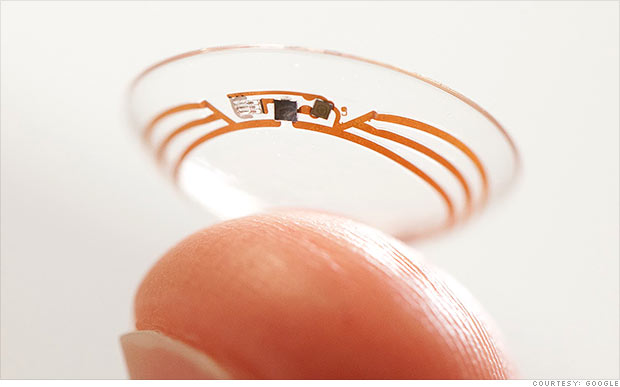
Google's smart contact will sit on the eye like conventional contacts, but do much more. Google's initial idea is to measure blood sugar in tears for diabetics with electronics integrated into the contact. Instead of drawing blood to monitor blood sugar Google's smart contact would analyze blood sugar within tears. This system would eliminate or reduce painful finger pricks and also allow for more frequent testing. A small LED light inside the contact would then illuminate different colors depending on the blood sugar reading.

While this technology is still in development the idea is very exciting. If smart contacts could benefit diabetics maybe Google can adapt them to benefit people with other disabilities or conditions. Could a contact detect sound and give a visual notification to a deaf user? Imagine this, a smart contact for the deaf senses volume of sound and direction and notifies the user. A loud sound off towards a user's right side would illuminate the right LED very brightly while a soft sound off towards a user's left would dimly illuminate the left LED. While Google has only confirmed smart contacts are in testing for blood sugar testing it is exciting to think about the possibilities five or ten years down the line. Hopefully smart contacts for blood sugar monitoring will reach the market sooner than later and will assist people with diabetes.

Click read more to view a short video about Google smart contacts.


Microsoft and GW Micro Team Up to Offer Window-Eyes Free to Office Users

Microsoft and GW Micro Team Up to Offer Window-Eyes Free to Office Users


GW Micro, the makers of the Window-Eyes screen reader, has teamed up with technology giant Microsoft to offer Windows-Eyes to Microsoft Office 2010 and newer users for free. Windows-Eyes can read elements on the screen aloud allowing the blind, low-vision, and print disabled to have full access to their Windows PC. Window-Eyes can also output on-screen content to a Braille display for users who prefer Braille. This new partnership will increase the affordability of Window-Eyes and allow more people to benefit from its features. Window-Eyes normally costs almost $900 while Microsoft Office costs far less. GW Micro and Microsoft believe this new partnership will allow millions of new users to access their computers using Window-Eyes. Rob Sinclair, Microsoft's Chief Accessibility Officer says the following about this new program,
"By partnering with GW Micro in this endeavor we are demonstrating Microsoft's onging commitment to provide all of our customers with the technology and tools to help each person be productive in both their work and personal lives."
This announcement is very significant in the world of assistive technology. This deal will allow millions of users to increase the usability of their computers for free if they already own Microsoft Office. Owners of Microsoft Office 2010 or higher can download Window-Eyes by visiting WindowEyesForOffice.com and following the instructions on screen.

Minggu, 10 November 2013

Bookshare Offers Free Membership to Disabled Veterans Attending School

Bookshare Offers Free Membership to Disabled Veterans Attending School


Bookshare recently announced that they will be providing free membership for disabled veterans who are currently attending a United States college or university. Bookshare also serves disabled civilian students and others with print disabilities by providing free downloadable accessible books. Veterans who qualify, but are not enrolled in school will have access to a 30 day free trial. After the trial veterans continue using Bookshare for a $50 yearly membership fee. Especially on Veterans Day it is great that veterans who are disabled will be able to access over 215,000 accessible books from the Bookshare library. Bookshare's press release says,
"Accessible books can break down reading barriers and open a new lifeline to reading to go back to school, learn a new vocation or read for pleasure."
A membership provides an individual with electronic books that can be read with text-to-speech or used with a braille device. This makes reading possible for people who are blind, low vision, physically disabled, or dyslexic. Interested veterans can find more information by visiting Bookshare's veterans site. People interested in Bookshare who are not veterans can visit Bookshare.org.

Jumat, 20 September 2013

New in iOS 7: Redeem iTunes Gift Cards with the Camera


Apple’s new mobile operating system for iPhone, iPad, and iPod Touch includes the ability to redeem iTunes gift cards with the camera instead of manually typing long codes. To redeem a gift card with the camera go to the iTunes Store, App Store, or iBooks Store and hit redeem at the bottom of the featured page. Then choose to redeem the gift card with the camera. You can use either the front facing or rear facing camera. To redeem the gift card just point the camera at the back of the gift card and the code is automatically redeemed. This new feature makes it possible for the blind and visually impaired to redeem gift cards without sighted assistance. Also, iOS 7 eliminates the need for sighted users to type in long and complicated codes. iOS 7 is available now for iPhone, iPad, and iPod Touch.

Senin, 29 Juli 2013

Amazon, Sony, and Kobo Don't Want to Make Their E-Readers Accessible

Amazon, Sony, and Kobo Don't Want to Make Their E-Readers Accessible


Some of the top names in the e-reader market are asking the Federal Communications Commission (FCC) to waive the accessibility requirements for their devices. Amazon, Sony, and Kobo have all petitioned the FCC to waive the accessibility requirement for their e-readers. They do not want to have to make their devices "accessible to and usable by individuals with disabilities."

The FCC requires advanced communication services (ACS) to be accessible to people with disabilities. The e-reader companies are arguing that their devices do not fall under the ACS classification because they are dedicated to e-book reading. The three companies also claim that adding accessibility features would decrease battery life, increase cost and increase bulk. They claim in the FCC document,
"Rendering ACS accessible on e-readers would require fundamentally altering the devices and it may not be possible to meet that requirement and maintain e-readers as inexpensive mobile reading devices, and yet the necessary changes, if they were made, would not yield a meaningful benefit to individuals with disabilities. It’s not merely cost but the very nature of a specialized e-reader device that is at issue."
Disabilities rights advocates content that because e-readers are not only being used for leisure, but also education the devices should be required to be accessible. Furthermore, Amazon has over a 100 million Kindle-exclusive titles according to the Wall Street Journal. If Kindles are not usable by the blind and people with other disabilities such as dyslexia they are shut out from this content.

It is questionable if adding accessibility features will really slow down and bulk up e-readers as the companies claim. A more realistic possibility is that the companies see adding accessibility features as an unwanted cost and challenge. Instead of requesting waivers from the government these e-reader companies should focus on making devices that are usable to the masses. Adding accessibility feature to devices is important and benefits the consumer as well as the company. With accessibility features e-readers can be purchased in public school, there are more potential customers, and the public will view the company in a better light.

The FCC is requesting the public's input in this matter through Tuesday, September 3. People interested in making a comment can do so by clicking here. The full petition can be read here.

Update: Amazon's newest Kindle Fire HD and Kindle Fire HDX include new accessibility features. Click here to learn more about the new accessibility features.

Senin, 15 Juli 2013

Bookshare Reaches 200,000 Accessible Downloadable Titles

Bookshare Reaches 200,000 Accessible Downloadable Titles

Recently Bookshare's downloadable library of accessible ebooks reached 200,000 titles. The 200,000 mark comes just months after the 11th anniversary of the service. Bookshare books contain digital text and can be read with text-to-speech and synchronized highlighting. Text-to-speech paired with synchronized highlighting can help dyslexics with comprehension. Members can also read books on a refreshable braille display. As a result of funding from the United States Department of Education Office of Special Education Programs (OSEP) Bookshare is able to provide its services free to qualified U.S. students. For information on membership click here. Members are provided with software to read Bookshare books on their Mac or PC but  Bookshare books can also be read on many other devices including iOS devices using the  Read2Go or Voice Dream Reader app. An Android app called Go Read is also available.

Jumat, 31 Mei 2013

Eyes-Free Typing App Fleksy Coming to Android With One Major Advantage Over iOS Version


Fleksy the eyes-free typing app that originally debuted for iOS is now available in beta for Android. Fleksy uses gestures and text prediction to allow users to type without looking a the screen. Fleksy can be extremely helpful for the blind and visually impaired and can dramatically increase typing speed people who cannot see the screen. Unlike the iOS version the Android version can replace the default keyboard and be used with any app. In iOS you cannot use Fleksy in an email app or with the messages app but on Android you can. Besides integration with Android apps the Android version will be similar to the iOS version. Android users can try the Fleksy by visiting the Fleksy Beta Google+ page.


Click read more below to view a video about Fleksy.


Selasa, 30 April 2013

3D Printers Have Enormous Potential To Help Blind


3D printers are still new in the consumer technology market, but  3D printers have huge potential to help the blind and visually impaired. To be clear this technology is still in its infancy. Imagine a blind student reading about a geometric figure or a molecule, but who cannot understand the make up or configuration of the object. A sighted user might be able to gather the necessary information through an image but a blind student might need hands-on time for a better understanding of the object. This is where the 3D printer comes into play. If a digital 3D file is available the blind student could print out the object quickly right in their home or classroom. 3D printers typically print a model layer by layer in plastic A blind person could print a model of a building or car in order to gain a better understanding of the architecture or design. As shown in the above picture some current 3D printers can print objects the size of the basketball. The the student could feel and examine the object. For this promising technology to become a reality pricing would have decrease to allow schools or individuals to purchase the devices. Also, content creators would have to make printable 3D files available for public use.

Click read more below to watch videos about 3D printers.


Rabu, 20 Maret 2013

TapTapSee: Amazing iOS App Recognizes Almost Anything


An iOS app called TapTapSee can recognize almost anything that you can take a picture of. TapTapSee is designed for the blind or visually impaired so it requires VoiceOver to be enabled. Click here to download the app for free. With the app open simply point the devices camera at an object and double tap to take a picture. Then TapTapSee recognizes the image with amazing speed and accuracy. In my tests the app was able to distinguish a salt shaker from and nearly identical pepper grinder. The app took an average of 10-15 seconds for each image. Keep in mind that you will need an internet connection for the app to work. With a few exceptions TapTapSee recognized everything that I took a picture of. The app is truly amazing because of its accuracy and detail it is able to provide in a short time. Visually impaired users could use the app to distinguish between two similar feeling objects. The app can also recognize all denominations of US currency but unlike the LookTel Money Reader TapTapSee cannot recognize foreign currencies. TapTapSee is also much faster than competing apps such as VizWiz. TapTapSee is a perfect addition to any iOS device for vissually impaired users.

Click read more below to view the app in action.


Minggu, 30 Desember 2012

Favorite Assistive Technology Apps & Products of 2012


As 2012 comes to a close I decided to make a run down of my favorite assistive technology apps and products that I have been using this year. This list is in no particular order.

Click read more view the list.


The Sky WiFi Smartpen is easy to use and seamless. It has a built in recorder and camera that, when used with specialized paper, syncs audio and written notes in the cloud. To read the Sky WiFi Smartpen review click here.


iPad mini is a great tablet because of its size, app selection, and accessibility. The lower price point makes it even more compelling. Most of all iPad mini runs all the apps that the full size iPad does and has accessibility features second to none. Click here to read more about the iPad mini.


While iOS 6 many have been short on mainstream features it has several useful accessibility features including Guided Access, highlighting with Speak Selection, Siri improvements, and VoiceOver improvements. Click here to learn more about iOS 6.


This update included great new voice search feature that I found to be better and faster than Siri. Click here to learn more about the Google Search App for iOS.


This app has a really nice interface and good scan quality which made it my favorite scanning app of 2012. Click here to learn more.


Prizmo is hands down the best OCR app for iPhone that I have used. Just take a picture of a document and it will read it to you in a matter of seconds. Click here to download or learn more about Prizmo.


A great reader of Bookshare books that allows you to read your books portably without a computer. Bookshare is an online accessible library avalible to qualified people. Click here to download or learn more about Read2Go.


Kurzweil isn't new to 2012 but it is a program I use everday. It helps me tremendously and it deserves a spot on this list. Click here to learn more about Kurzweil 3000.


Good app for listening to Learning Ally Audio books. The free app is available for all iOS devices. I would like to see the app include new features such as background audio in 2013. Click here to learn more.


Selasa, 27 November 2012

Nook App for iOS Updated to Support VoiceOver and Zoom

Nook App for iOS Updated to Support VoiceOver and Zoom


Great news, the Nook app for iPhone, iPad, and iPod Touch is now accessible to the blind, visually impaired and people with print disabilities. The updated app now supports VoiceOver and Zoom. VoiceOver and Zoom are built in accessibility features in iOS. To learn more about VoiceOver click here. With VoiceOver you can have the book read aloud using text-to-speech. Oddly enough the update makes the Nook app more accessible than current Nooks. Serious kudos to Barns & Noble's for making their app accessible. To download the app for free click here.

Click read more below to view more screenshots.


Selasa, 16 Oktober 2012

Apple To Hold Special Event On October 23

Apple To Hold Special Event On October 23

colorful design with white apple logo at bottom

Apple issued invitations to select members of the media for an October 23 special event. The event will begin at 10 AM pacific. Apple is rumored to announce a new smaller iPad dubbed iPad Mini and possibly updated Macs. If the rumors are to be believed an iPad Mini could be a great device for education because of its smaller size and rumored lower price point. No matter what Apple announces on the 23rd chances are that it will have accessibility features to make it usable for those with disabilities. Check back on the 23rd to learn about Apple's announcement and the accessibility implications.

Senin, 08 Oktober 2012

iOS 6: VoiceOver Compatiblity with Maps, Assistive Touch, and Zoom


iOS 6 the latest operating system for iPhone, iPad and iPod Touch includes new VoiceOver enhancements. The enhancements allow VoiceOver users to use zoom, Assistive Touch and maps simultaneously with VoiceOver. These new features are built into iOS 6 so there are no additional downloads. Watch the above video to learn more about VoiceOver improvements in iOS 6.

Rabu, 12 September 2012

iPhone 5 Announced

iPhone 5 Announced


Apple announced the iPhone 5 at an event today in California. The iPhone 5 includes and bigger screen, better camera, faster processor, thinner design and more. The iPhone 5 will run on iOS 6 Apple's mobile operating system which includes accessibility features such as VoiceOver, Guided Access and Speak Selection. Click here to learn more about iOS 6.

The iPhone 5 will be available for pre-order on September 14th and for sale on September 21th starting at $199. Click read more below to view more images of the iPhone 5.


iOS 6 To Be Released on September 19th With New Accessibility Features

iOS 6 To Be Released on September 19th With New Accessibility Features


Today, Apple announced that iOS 6, the software that runs iPhone, iPad and iPod Touch, will be released on September 19th. The free software update will include new accessibility features such as Guided Access, Speak Selection with highlighting and improved Siri. Click here to learn more about Guided Access. iOS 6 will also include Made For iPhone Hearing Aids which allow hearing aid users to better use the iPhone. Along with accessibility improvements iOS 6 includes an updated maps app and more.

Click read more below to view more images of iOS 6 from Apple.


How To Use
  • Put the link on the
  • Generate Link box with http:// or https://
  • Use  CTRL + V  on keyboard to put the link.
  • Click Generate button to get encrypted link.
  • Click Copy URL button.
  • Done