MegaRid: learning disablity
News Update
Loading...
Tampilkan postingan dengan label learning disablity. Tampilkan semua postingan

Selasa, 21 Juli 2015

Inspiration Maps Updated with iPhone Support and More

Inspiration Maps displayed on iPhone 6

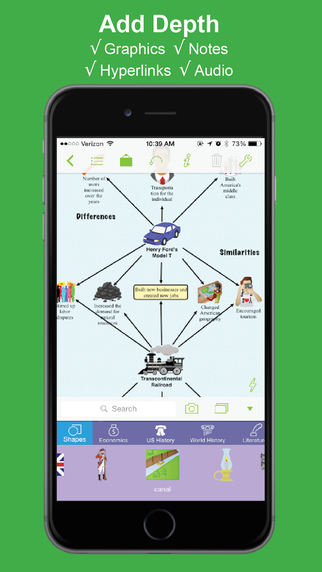
Inspiration Maps iconThe mind mapping and outlining app Inspiration Maps, which was previously only available on the iPad, is now available on the iPhone as well. The app is a valuable tool to help students organize their ideas and start the writing process. Users can drag text boxes around the screen to easily produce webs of ideas. Inspiration Maps is particularly helpful when writing about complex topics that require a well planned and organized essay. Inspiration Maps can be also be helpful when beginning an essay to visualize the structure that the written piece will take.

With the larger screen iPhone 6 and iPhone 6 plus in makes sense to bring the app to the iPhone. If you are concerned about not having enough room to effectively use the app on your iPhone, a free version is available here.

The update also makes in easier to select multiple text boxes or images at the same time. Now users can press and hold on the screen in order to lasso a group of images.

The updated app is available for $10 is the App Store. Click here to download the app. Click read more below to view more screenshots of Inspiration Maps for iPhone.


graphic highlighting brainstorming

screenshot showing ability to add graphics, notes, hyperlinks, and audio

screenshot showing the ability to flip between web and outline view

Senin, 25 November 2013

Livescribe 3 Smartpen: Do More With Your Written Notes


By combining the ease of hand writing, the power and accessibility of Apple's iOS devices, and audio, the Livescribe 3 Smartpen is a powerful tool.  With the smartpen you can start writing on a pad of paper and see your handwriting appear on your iPad or iPhone almost instantly.

When taking notes It can record audio that is linked to your handwriting, allowing you to easily hear what was happening exactly when you were writing.  It can easily search through notebooks of handwritten pages to find the right note in an instant, and it allows you to share your notes with anyone without copying or scanning.

The Livescribe 3 Smartpen is not just a refinement of last year's Sky Wifi Smartpen. The Livescribe 3 Smartpen adds new functionality by pairing it with an iPhone, iPad, or iPod Touch. The Livescribe 3 is still capable of syncing handwriting and audio, but instead of recording the audio from a built in microphone, the recording happens on an iPhone or iPad paired to the pen with Bluetooth. With the pen connected to an iOS device using Bluetooth, features like handwriting recognition and cloud based storage options are handled by the iOS devices. Most of the pens functionality is handled with the free Livescribe+ app that seamlessly manages the Smartpen.

Read on to find out more about the Livescribe 3.

Hardware and Requirements

The Livescribe 3 is a sleek and streamlined device that is about the same size as some thicker standard pens. The pen twists open to reveal the ball point tip. No more forgetting to turn on your pen, it turns on automatically when the tip is out. At the bottom is a special camera that allows the pen to track its location on the page. At the top of the pen is a stylist tip. The stylist tip hides a micro-USB charging port. Speaking of charging, Livescribe claims the pen gets 14 hours of battery life. At the top there is also an indicator light that shows the status of the pen. The Livescribe 3 uses advanced Bluetooth to connect to the companion app. The pen only supports Apple devices because they have the widest compatibility with the new Bluetooth standard. Livescribe may support Android devices when advanced Bluetooth is more widely available. The pen is compatible with iPhone 4S and newer, iPad 3rd generation and newer, and iPod Touch 5th generation. The companion app requires iOS 7.

The Livescribe 3 requires a special dot paper that Livescribe sells on their website. Some may think of this a negative, but the Livescribe notebooks come in a variety of sizes and are competitively priced.

Livescribe+ App

The Livescribe+ app is the brains of the Livescribe 3 smartpen. The pen sends your notes to the app over Bluetooth and then processes the handwriting and turns it into digital text. The app makes it easy to review notes in a page view or list view. Because the app turns handwriting into digital text, it is simple and fast to search through your notebook. You can search by keyword and easily find all associated notes. Once your handwriting has been converted to digital text you can use the built in iOS Speak Selection feature to have your note read aloud with text-to-speech.

The handwriting recognition was amazingly accurate even with my sloppy handwriting and if it does make a mistake you can manually correct it. If you write down a phone number or an address you can save the information as a contact with one tap. If you write down a homework assignment you can save it directly into your Reminders list which is a nice touch. Using an iOS device as the brains of the smartpen allowed Livescribe to remove the screen, speaker, microphone, and wifi which considerably slimmed down the pen. Using an external microphone eliminates the writing noise that the Sky Wifi Smartpen picks up.

Taking the microphone out of the smartpen does not come with out compromise. Because the smartpen relies on the iOS devices microphone you can not record audio without an iOS device nearby. You can still capture your written notes and sync them next time you have your iOS device handy. For some who don't always have their device close by, but still want to record audio the Sky Wifi Smartpen is a great option. If you always have your device close by this won't be an issue.

Sharing your notes is one area where the Livescribe+ app really shines. Using the standard iOS 7 share sheet you can share your notes to any app that supports PDFs. This includes Evernote, Dropbox, Google Drive, and many others. Currently recipients of your documents that don't own an iOS 7 device can only view your handwriting and cannot play back the audio and linked notes known as a pencast. It is really unfortunate that the ability to view pencasts on desktops and Android devices was not present at launch. 

Benefits

The Livescribe 3 can benefit many people who need to keep useful notes for work or school. It can be especially useful for students with learning disabilities who struggle to take or keep notes. For example if a teacher is talking about graphing points and the student gets distracted, he can easily go back in his notes and listen to the audio at a later time.

Teachers and special educators who have multiple students who get class notes provided as an accommodation can easily use the Livescribe+ app to share the note instantly with everyone in the class. This eliminates the need for hard-to-read carbon paper or delays due to photo copying. For people who struggle with organization, the ability to search for notes maybe enough of a reason to purchase the pen. Using a conventional ball point pen for writing is much easier than using a stylus to write on an iPad. The Livescribe 3 gives you the ability to write with a ball point tip while still getting all of the benefits of having your notes on your iPad.

Possibilities

The Livescribe 3 Smartpen and Livescribe+ app have really solid features that have benefits right out of the box. If you decide to buy the pen you should decide to because of the features currently available, but with very capable hardware and the flexibility of an iOS app Livescribe could and should continue to improve the product. One feature that I would like to see added is the ability to speed up and slow down audio playback. Variable playback speed makes it easy listen to more audio in less time. With the Sky Wifi Smartpen this was an option, but it is not currently available in the Livescribe+ app. Audio transcription is another feature that would be a great addition to the Livescribe+ app. Imagine listening to a lecture and having the entire text transcript of the professor even if you weren't able to write everything down.  With improving speak recognition software this feature is probably technically possible.

Pricing and Availability

The Livescribe 3 starts at $150 for the starter edition. A pro edition with a darker finish, larger leather starter notebook, replacement ink, one year premium Evernote access sells for $200. Both editions are avalible from Livescribe's website.

Videos and Images


Device was provided complimentary to reviewer

Minggu, 30 Desember 2012

Favorite Assistive Technology Apps & Products of 2012


As 2012 comes to a close I decided to make a run down of my favorite assistive technology apps and products that I have been using this year. This list is in no particular order.

Click read more view the list.


The Sky WiFi Smartpen is easy to use and seamless. It has a built in recorder and camera that, when used with specialized paper, syncs audio and written notes in the cloud. To read the Sky WiFi Smartpen review click here.


iPad mini is a great tablet because of its size, app selection, and accessibility. The lower price point makes it even more compelling. Most of all iPad mini runs all the apps that the full size iPad does and has accessibility features second to none. Click here to read more about the iPad mini.


While iOS 6 many have been short on mainstream features it has several useful accessibility features including Guided Access, highlighting with Speak Selection, Siri improvements, and VoiceOver improvements. Click here to learn more about iOS 6.


This update included great new voice search feature that I found to be better and faster than Siri. Click here to learn more about the Google Search App for iOS.


This app has a really nice interface and good scan quality which made it my favorite scanning app of 2012. Click here to learn more.


Prizmo is hands down the best OCR app for iPhone that I have used. Just take a picture of a document and it will read it to you in a matter of seconds. Click here to download or learn more about Prizmo.


A great reader of Bookshare books that allows you to read your books portably without a computer. Bookshare is an online accessible library avalible to qualified people. Click here to download or learn more about Read2Go.


Kurzweil isn't new to 2012 but it is a program I use everday. It helps me tremendously and it deserves a spot on this list. Click here to learn more about Kurzweil 3000.


Good app for listening to Learning Ally Audio books. The free app is available for all iOS devices. I would like to see the app include new features such as background audio in 2013. Click here to learn more.


Minggu, 25 November 2012

Livescribe Sky Wifi Smartpen: Handwriten Notes With Audio in the Cloud


Overview:

The Sky Wifi Smartpen from Livescribe is a WiFi enabled pen that has a built in audio recorder. This allows you to digitize handwritten notes which you can sync to Evernote wirelessly when in a compatible WiFi hotspot. (See below for Evernote description) The smartpen allows you to take handwritten notes which are linked to an audio recording of what was being said at the time you wrote your notes. The pen can record audio using a built in or external microphone. Using specially designed note paper, you simply touch "record" at the bottom of the dot paper page and begin writing notes. The camera at the bottom of the pen tracks where you write and the built in microphone records what is being said. The result is that your writing is linked with whatever was spoken at the time. In other words each pen-stroke is linked with the sound that you heard at that time. So if you are in class and your teacher is discussing President Washington and you write "President Washington" later you can playback everything the teacher said about Washington at that time by touching the pen to the words "President Washington."

Many of the pen's functions are accessed by touching buttons printed on the specially designed dot paper with the tip of the pen. When you are done taking notes you simply press the stop button at the bottom of the dot paper notebook and your handwriting and audio recording is automatically synced to Evernote. Click here to view a sample note. From Evernote you can view the note and listen to the audio or share the note.

Click read more below to read the full review.

Benefits:


The Sky Wifi Smartpen has numerous benefits for students, business people, and teachers. The pen allows you to hand write your notes but still have them available electronically. The linked audio is great for reviewing and remembering class notes or business meetings. Also you do not need to worry about using a stylus and tablet.

Set up:


Setting up the Sky WiFi Samrtpen was a bit complicated. Luckily it is a one time set up. In order to connect to Wifi you must use the printed keyboard on the inside cover of your specially designed dot paper notebook. However, you currently cannot connect to wifi networks with hidden SSIDs or networks that require a sign-in or agreement page to connect. Connecting the pen to your Evernote account is very easy.

Hardware:

The smartpen looks like a normal pen but is a bit thicker in order to accommodate all of the electronics. It is comfortable to hold and easy to write with. The pen only includes one physical button which turns the pen on and off. On the front is a small screen, microphone, and speaker. The microphone works well even from long distances, but sometimes picks up the sound of the pen writing. The speaker is adequate for personal use in a quiet room but you can also plug in headphones to the headphone jack on top. The top also has a micro-USB for charging. On the bottom is the ball point tip which is replaceable and a camera which tracks where you are writing on the dot paper. The bottom half of the pen has a slightly rubberized feel that prevents the pen from slipping from your grip. Having wifi turned on degrades battery life but you can turn wifi off by taping the wifi off button on the front cover of your notebook.

Evernote:


Evernote integration is a huge plus for the Sky Wifi Smartpen. It makes it seamless to view and listen to your notes on virtually any devices. Evernote is a free internet storage service designed especially for note taking. Evernote is an online services designed to help you organize notes and information. Evernotes has apps for iOS, Android, Windows Phone, Blackberry, Windows, and Mac. Evernote also allows you to search for text within your notes and organize notes using tags. Evernote also makes sharing a breeze. Your shared pen casts can be view and played on almost any device with the Livescribe player. From within the Livescribe player you can click on any part of your notes to hear what was being said at that time.

Accessories:


The smartpen needs dot paper to work. You can print the dot paper from certain printers or buy it from Livescribe's website. The dot paper comes in notebooks, sticky notes, or index cards and cost somewhat more than normal paper. One small notebook is included with the smartpen. You can add  a recording headset that adds external microphones for increased audio quality. Standard headset such as the Apple headphones with microphone will also work.

Uses:


The smartpen has exciting educational applications. It can be used to help students who have trouble with note taking or who need a little extra help reviewing for tests and quizzes. Students can outline notes and rely on the audio to supplement anything that wasn't written. It could also be used for people with attention issues because if they forget to write down something they can still go back and listen to what they missed. One very exciting application of the pen is for students who are exempt from taking notes. The student who takes notes for the students with disabilities could use the pen to take notes and then immediately email the notes to any student who needs them. This would eliminate any delays in receiving notes and would also not require a teacher to make copies. It also eliminates concerns about the readability of carbon copy notes.

Still To Come:

Sometime in early 2013 a wireless software update will allow you to share your notes to Dropbox, Email, Facebook, and Google Drive. Stay tuned to the Assistive Technology Blog for news about the Sky Wifi Smartpen.

Pricing and Availability:

The Sky Wifi Smartpen costs $150 for 2gb of storage, $200 for 4gb, and $250 for 8gb. Storage is internal and non-upgradable. The smartpen is available online at Livescribe.com and select Best Buy stores.

Videos:


The device was provided complimentary to reviewer .

Selasa, 06 November 2012

Ask Google Voice Search How To Spell Unfamiliar Words


Google's recently update Google Voice Search is very useful and extremely fast. There are also a few tricks that can make the app even more useful. One trick is to ask Google Voice Search "how do you spell..." Google will quickly return the correct spelling of the word and speak the spelling aloud. Unlike Siri, Google Voice Search speaks the spelling back to you so you do not need to look at the screen. This trick is especially useful for people with dyslexia and people who are struggling spellers.

Selasa, 30 Oktober 2012

Google Search App Updated With Advanced Voice Search Similar to Siri


Google just updated its iOS search app to include advanced voice search. The new feature is similar to Apple's Siri. Click here to download the free app. With the Google Search app you can ask questions by voice and get spoken feedback. The Google app is very quick and the voice recognition is accurate. It is almost indential to the voice search included in Android 4.1 Jelly Bean. It is able to answer a broad range of questions and always has Google search results to fall back on. The Google app cannot read text messages, call people, set reminders, dictate notes, set alarms or be used from the lock screen like Apple's Siri. The Google app is still great for asking questions and getting good answers. Also for people without Siri the Google app is a great alternative. 

Watch the video above to see Google voice search in action. Click read more below to view screenshots of the Google Search app in action.


Senin, 01 Oktober 2012

How to Use iOS 6 Speak Selection With Highlighting


Apple's newly released iOS 6 includes a new improvements to Speak Selection that highlights words as they are read aloud. Click here to learn how to update to iOS 6. The new feature is available on any iPhone, iPad or iPod Touch running iOS 6. To access the feature go to settings > general > accessibility > speak selection. Once enabled simply highlight any text and press speak to have the text read with text-to-speech. Speak Selection is great for people with dyslexia or for reviewing documents.

Minggu, 19 Agustus 2012

Back To School Apps

Back To School Apps


The start of school is just around the corner. Teachers, students and parents are preparing for another year. Below is a list of iPhone, iPad and iPod Touch apps that could be helpful for the upcoming school year.


Read2Go is the best way to access Bookshare.org books on your iOS device. Bookshare provides free accessible eBooks for people with print disabilities. Click here to learn more about Bookshare. Once you download the app you can download over 150,000 books directly to your device. The best part of Read2Go is that students can easily read books anywhere because of the portability of iOS devices. To learn how to become a member click here.


Learning Ally (formally RFB&D) provides audio books to people with print disabilities. Members must pay a yearly fee in order to download books. To learn about how to become a member of Learning Ally click here.


Prizmo converts a picture of a document into text which can be read using text-to-speech. In short from document to text to speech in just seconds. Prizmo is also the fastest and most accurate optical character recognition (OCR) app I have every tested.


iBooks is Apple's eReader app. It is simple to use and accessible using VoiceOver. With iBook Textbooks students and teachers can download select textbooks onto their iPad.


iTunes U allows you to follow along with select classes from your iOS device. You can download classes from top universities and watch videos of the classes and read documents provided by the professor.


Great videos that walk you through many concepts from almost all subject. This app is great for homework help and learning new concepts. To learn more about Khan Academy click here.

Sabtu, 28 Juli 2012

Voice Dream Reader App For iOS


Voice Dream Reader is a text-to-speech app for people with reading disabilities or people who just prefer to listen to text. The app costs $4.99 in the App Store. Click here to download the app. Voice Dream Reader can extract text from ePub, PDF, Word, Pages, Keynote and web pages and then read them aloud using text-to-speech with synchronized highlighting. Watch the above video to learn more. Voice Dream Reader comes pre-loaded with the Heather voice, but additional voices can be purchased for $0.99. One downside is that all text formatting and all images are extracted and not visible.

While reading a document you can change the speech rate, text size and background color. While reading a document it is easy to skip around in the text and look up words. The app cannot read the definitions so you will need to turn on VoiceOver. It is unfortunate that the app does not read the definition because some people may not be familiar with VoiceOver. Voice Dream Reader can be synced with a number of cloud services including Dropbox to get documents into the app.
In all Voice Dream Reader is a solid app. For some, the built in Speak Selection feature may be good enough. With iOS 6 coming in the fall, Speak Selection will have syncronized highlighting which will make some features of Voice Dream Reader obsolete. If you want the ability to create playlists or read with multiple voices this app is for you.
Click read more below to view screenshots of Voice Dream Reader in action.


How To Use
  • Put the link on the
  • Generate Link box with http:// or https://
  • Use  CTRL + V  on keyboard to put the link.
  • Click Generate button to get encrypted link.
  • Click Copy URL button.
  • Done