MegaRid: deaf
News Update
Loading...
Tampilkan postingan dengan label deaf. Tampilkan semua postingan

Selasa, 23 Desember 2014

MotionSavvy's UNI Tablet: A Break Through in Sign Language Communication


For people who use sign language to communicate, interacting with people who do not know sign language can be an enormous challenge and create barriers for people who are hearing impaired. Until now, the best alternative might have been writing out notes on a piece of paper. However, an upcoming product from a company called MotionSavvy hopes to offer a better solution.

The solution does not look like the advanced piece of assistive technology that it is, but rather looks like a thin tablet with a Leap Motion device attached to the front. The Leap Motion senses the motion of the users hand to recognize signs using multiple cameras. Once the table recognizes the signs it can display the signed phrase as text on screen or even as spoken words with text-to-speech. This allows the other person that does not know sign language to understand what is being signed. Then the other person can speak into the tablet and speech recognition technology will allow the words to appear on the screen for the hearing impaired person to read.

This technology can allow deaf and hearing impaired users to communicate with other people that do not know sign language without an interpreter or slow hand written messages. However there are some limitations that should be expected from a first generation product such as the UNI. Users will not be able to use their existing tablet with the software and will need to purchase both the Leap Motion device and accompanying Windows tablet and case through MotionSavvy. Also, the system may have difficulty interpreting the nuances of different sign language styles. Additionally only American Sign Language (ASL) will be supported initially. Luckily, MotionSavvy will include a feature to allow people to teach the device how to recognize new signs. With a feature called CrowdSign, the signs imported by one user can be shared with other users of the system. This will allow the library of recognizable signs to increase quickly provided users are willing to create and share their imported signs. However, because of the upkeep needed to maintain the CrowdSign features, users will need to pay a monthly fee to use the UNI tablet.

The MotionSavvy UNI tablet is expected to be released in early 2015. At this time, details on pricing are unclear, but MotionSavvy has said that the UNI will sell for more than $500 when released.

Selasa, 21 Januari 2014

Google Smart Contacts May Help Monitor Blood Sugar in the Future


Google is rapidly developing new wearable technologies. Google's first attempt at wearable technology, Google Glass, has attracted a lot of press attention, but is still not available on the mass market. They also cost $1,500. Google's next foray into wearable technology maybe less flashy and less expensive, but may have a greater assistive technology impact.

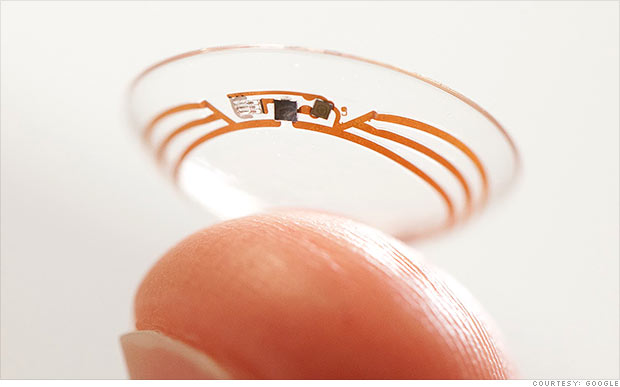
Google's smart contact will sit on the eye like conventional contacts, but do much more. Google's initial idea is to measure blood sugar in tears for diabetics with electronics integrated into the contact. Instead of drawing blood to monitor blood sugar Google's smart contact would analyze blood sugar within tears. This system would eliminate or reduce painful finger pricks and also allow for more frequent testing. A small LED light inside the contact would then illuminate different colors depending on the blood sugar reading.

While this technology is still in development the idea is very exciting. If smart contacts could benefit diabetics maybe Google can adapt them to benefit people with other disabilities or conditions. Could a contact detect sound and give a visual notification to a deaf user? Imagine this, a smart contact for the deaf senses volume of sound and direction and notifies the user. A loud sound off towards a user's right side would illuminate the right LED very brightly while a soft sound off towards a user's left would dimly illuminate the left LED. While Google has only confirmed smart contacts are in testing for blood sugar testing it is exciting to think about the possibilities five or ten years down the line. Hopefully smart contacts for blood sugar monitoring will reach the market sooner than later and will assist people with diabetes.

Click read more to view a short video about Google smart contacts.


Rabu, 06 November 2013

New in iOS 7 and Android KitKat: Customize Subtitles and Captioning

New in iOS 7 and Android KitKat: Customize Subtitles and Captioning


Both iOS 7 and Android KitKat include the ability to customize captions. Now both major mobile operating systems include the ability to customize movie and video subtitles system wide.. For iOS, the customization settings are under Settings > General > Accessibility > Subtitles & Captioning. From that menu you are able to change the appearance of subtitles of any video played through the default iOS video player. There are many options for customization including font, font size, font color, and background color. Android includes a similar feature that can also be accessed in the settings menu. These options are a welcome addition to mobile devices and can make subtitles much easier to see. It is great to see both Apple and Google improving accessibility on their mobile products.

Rabu, 24 April 2013

Amara Free Crowd Sourced Captioning For YouTubers


A service called Amara allows YouTubers to get crowd sourced help captioning their videos. Millions of people, particularly those with hearing impairments, rely on captions in order to watch movies and videos. Amara's goal is to have more captioned videos on the web. Anyone with a YouTube account can register with Amara.org for free. Then volunteers caption the videos for free. After the volunteers caption the videos the captions are then added to your YouTube video. Captioning videos can be difficult for individual video creators. Now with Amara there is no reason for YouTubers not to have their videos captioned. People can also volunteer to help caption more web videos.

Minggu, 10 Maret 2013

Google+ Hangouts Now Supports Sign Language Interpreters

Google+ Hangouts Now Supports Sign Language Interpreters


While video chatting has helped deaf users communicate with each other, conventional video chatting runs into problem when an interpreter is involved. Google is attempting to solve this problem with its sign language interpreter app for Google+. Google+ is Google's social networking service. Google+ Hangouts now supports sign language interpreters for deaf users. With the app installed the deaf user sees the interpreter in the top right corner of the window.  When the the interpreter speaks for the deaf users, the app recognizes who is speaking and then makes the speaker the focus of the Hangout.

It is encouraging to see Google vigorously improving the accessibility features in Google+.

Minggu, 30 Desember 2012

Favorite Assistive Technology Apps & Products of 2012


As 2012 comes to a close I decided to make a run down of my favorite assistive technology apps and products that I have been using this year. This list is in no particular order.

Click read more view the list.


The Sky WiFi Smartpen is easy to use and seamless. It has a built in recorder and camera that, when used with specialized paper, syncs audio and written notes in the cloud. To read the Sky WiFi Smartpen review click here.


iPad mini is a great tablet because of its size, app selection, and accessibility. The lower price point makes it even more compelling. Most of all iPad mini runs all the apps that the full size iPad does and has accessibility features second to none. Click here to read more about the iPad mini.


While iOS 6 many have been short on mainstream features it has several useful accessibility features including Guided Access, highlighting with Speak Selection, Siri improvements, and VoiceOver improvements. Click here to learn more about iOS 6.


This update included great new voice search feature that I found to be better and faster than Siri. Click here to learn more about the Google Search App for iOS.


This app has a really nice interface and good scan quality which made it my favorite scanning app of 2012. Click here to learn more.


Prizmo is hands down the best OCR app for iPhone that I have used. Just take a picture of a document and it will read it to you in a matter of seconds. Click here to download or learn more about Prizmo.


A great reader of Bookshare books that allows you to read your books portably without a computer. Bookshare is an online accessible library avalible to qualified people. Click here to download or learn more about Read2Go.


Kurzweil isn't new to 2012 but it is a program I use everday. It helps me tremendously and it deserves a spot on this list. Click here to learn more about Kurzweil 3000.


Good app for listening to Learning Ally Audio books. The free app is available for all iOS devices. I would like to see the app include new features such as background audio in 2013. Click here to learn more.


Rabu, 12 September 2012

iPhone 5 Announced

iPhone 5 Announced


Apple announced the iPhone 5 at an event today in California. The iPhone 5 includes and bigger screen, better camera, faster processor, thinner design and more. The iPhone 5 will run on iOS 6 Apple's mobile operating system which includes accessibility features such as VoiceOver, Guided Access and Speak Selection. Click here to learn more about iOS 6.

The iPhone 5 will be available for pre-order on September 14th and for sale on September 21th starting at $199. Click read more below to view more images of the iPhone 5.


iOS 6 To Be Released on September 19th With New Accessibility Features

iOS 6 To Be Released on September 19th With New Accessibility Features


Today, Apple announced that iOS 6, the software that runs iPhone, iPad and iPod Touch, will be released on September 19th. The free software update will include new accessibility features such as Guided Access, Speak Selection with highlighting and improved Siri. Click here to learn more about Guided Access. iOS 6 will also include Made For iPhone Hearing Aids which allow hearing aid users to better use the iPhone. Along with accessibility improvements iOS 6 includes an updated maps app and more.

Click read more below to view more images of iOS 6 from Apple.


Selasa, 04 September 2012

Apple To Hold Special Event on September 12

Apple To Hold Special Event on September 12

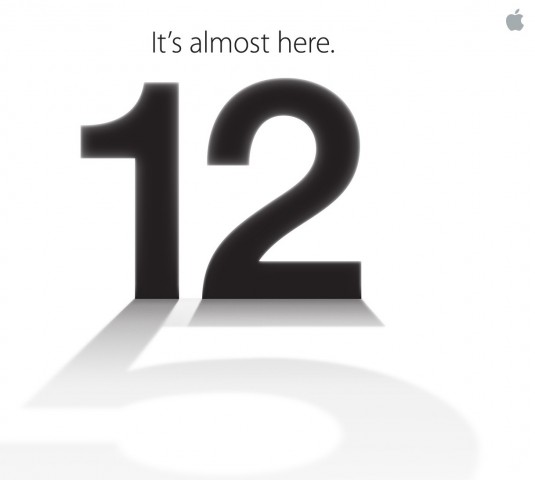
Number 12 casting a shadow of the number 5

Apple announced today that it will be holding a special event on September 12. Apple is rumored to announce a new iPhone, iOS 6 release data and possibly more. iOS 6 will include many accessibility enhancements including Guided Access. The new iPhone may include a better camera, faster processor and larger screen.

Come back on September 12 to hear all the new from Apple and how it effects the world of assistive technology.

Selasa, 24 Juli 2012

First ASL Narrated iBook Hits The iPad


A new iBook called Pointy Three includes built in American Sign Language (ASL) video narrations. Click here to download the iBook. Pointy Three costs $4.99 but you can download a sample for free. It is the first iBook to include ASL video narrations. An iPad is required to read the ebook. These video narrations are great for people learning ASL or parents of deaf children. Hopefully, the selection of ebooks with ASL narration will increase.

Watch the above video to learn more. Click read more below to view screenshots of Pointy Three.


Jumat, 13 Juli 2012

EnableTalk Coverts Signs Language Into Spoken Words


For the millions of deaf people communicating is a large challenge. EnableTalk is attempting to solve this problem with a pair of computerized gloves that recognizes sign language and uses text-to-speech to convert the signs to spoken language. Watch the above video to learn more. The prototype gloves link with a smart phone and use a variety of sensors to recognized the signs. An app on the users smart phone then speaks the signs using text-to-speech so people who do not know sign language can communicate with the deaf user. The gloves could end the need for a sign language user to pass notes to non-sign language user, but the non-sign language user would still need to pass notes back to the hearing impaired person. The EnableTalk seem promising and will hopefully be available to consumers in the near future. Click read more below to view a picture of the prototype gloves.


How To Use
  • Put the link on the
  • Generate Link box with http:// or https://
  • Use  CTRL + V  on keyboard to put the link.
  • Click Generate button to get encrypted link.
  • Click Copy URL button.
  • Done