MegaRid: accessible
News Update
Loading...
Tampilkan postingan dengan label accessible. Tampilkan semua postingan

Sabtu, 09 Agustus 2014

Redbox to Make Some Kiosks Accessible to the Blind

Redbox to Make Some Kiosks Accessible to the Blind


Popular video rental service Redbox agreed in a settlement to make 4,000 of their 35,900 kiosks located in California accessible to people who are blind or visually impaired. The service, which is commonly found in supermarkets and other public areas, is inaccessible to blind or visually impaired users. As part of the agreement, Redbox agreed to add headphone jacks, text-to-speech output, and tactile keyboards to kiosks. The roll-out of accessible video rental boxes will be gradual and is planed to take longer than two years. In the interim, Redbox has also agreed to provide phone support to help blind customers navigate the rental process. It is not clear if Redbox plans to add more DVDs with audio descriptions to benefit its new larger customer base of visually impaired users, but such a plan would seem to make sense. The settlement deal will inevitably increase Redbox's potential customer base by providing access to more people with disabilities. Unfortunately, the settlement seems to only cover a small fraction of Redbox kiosk in California. Hopefully, other kiosk companies will make their services accessible as well.
Selasa, 26 November 2013

ClaroPDF App: PDF Text-To-Speech and Annotation (Giveaway)


ClaroPDF is an accessible PDF reader with many annotation options. The app uses text-to-speech to read any text based PDF. The app also includes numerous annotations options including highlighting, text boxes, underline, strikeout, shapes, and images. ClaroPDF includes a simple design that matches the interface of iOS 7. Unfortunately, there is no full screen option that hides all controls so you can better focus on your document. To start reading a PDF you can use the open-in feature of many other apps or import a document using Dropbox. Then you can use a number of high quality text-to-speech voices to read the document at up to 240 words per minute. It would be nice to see the maxim speaking rate increased to around 400 word per minutes for people who are able to understand high rates of speech. To start reading the document you can just tap on a word a press the play button.

Currently in version 1.2.6 there is a bug that causes layout issues with certain documents. The issue causes documents to not fill the entire screen.

Besides a great interface ClaroPDF includes a wide variety of annotation options. These annotations are easy to add and manage. ClaroPDF even includes the ability to add voice notes. One option that is not included is the ability to automatically add text notes to every blank in a document. This feature would significantly speed up the process of filling out forms.

ClaroPDF costs $0.99 and works on the iPhone, iPad, and iPod Touch. Watch the video above to see ClaroPDF in action a click read more below to view screenshots of ClaroPDF in action. Click read more below for giveaway details.

Giveaway

Retweet and follow the ClaroPDF below tweet  for a chance to win one of ten promo codes. Code expires on 12/24/13 and is redeemable only on the iTunes Store for the United Kingdom. Requires an iTunes account, subject to prior acceptance of license and usage terms. To open an account you must be above the age of 13 and in the United Kingdom. Compatible software and hardware, and internet access (fees may apply) required. Not for resale. Full terms apply; see www.apple.com/legal/itunes/ww/. For more information, see www.apple.com/support/.


Jumat, 21 September 2012

Best Apps For Your New iPhone 5

Best Apps For Your New iPhone 5


Did you get the iPhone 5 today? Below is a list of apps to make the most out of your new iPhone 5.


Read2Go is the best way to access Bookshare.org books on your iOS device.Bookshare provides free accessible eBooks for people with print disabilities. Click here to learn more about Bookshare. Once you download the app you can download over 150,000 books directly to your device. The best part of Read2Go is that students can easily read books anywhere because of the portability of iOS devices. To learn how to become a member click here.


Learning Ally (formally RFB&D) provides audio books to people with print disabilities. Members must pay a yearly fee in order to download books. To learn about how to become a member of Learning Ally click here.


Prizmo converts a picture of a document into text which can be read using text-to-speech. In short from document to text to speech in just seconds. Prizmo is also the fastest and most accurate optical character recognition (OCR) app I have every tested.


iBooks is Apple's eReader app. It is simple to use and accessible using VoiceOver. With iBook Textbooks students and teachers can download select textbooks onto theiriPad.


iTunes U allows you to follow along with select classes from your iOS device. You can download classes from top universities and watch videos of the classes and read documents provided by the professor.


Great videos that walk you through many concepts from almost all subject. This app is great for homework help and learning new concepts. To learn more about Khan Academy click here.

Selasa, 11 September 2012

HumanWare Communicator a Great Tool For Deaf-Blind Communication

HumanWare Communicator a Great Tool For Deaf-Blind Communication


HumanWare recently released the HumanWare Communicator app for iOS devices. The app is designed to make communication between a deaf-blind person and a sighted person possible.When the conversation is started an introduction is displayed for the sighted user to read. The deaf-blind person uses a Bluetooth braille display to type a message to a sighted person, this message appears on the screen of the iPhone, iPad or iPod Touch.  Then the sighted user can respond using the virtual keyboard and the message will appear on the refreshable braille display. The conversation can then go back and forth with the deaf-blind person typing on the braille display and the sighted user typing on the device's virtual keyboard.

HumanWare describes the app as follows,
"The HumanWare Communicator application is intended to establish a text conversation, through a chat window, between a deaf-blind person and a sighted person. All interaction appears both on the deaf-blind person's refreshable Braille display, as well as visually on the screen of the iOS device."
The HumanWare communicator is available in the App Store for $99.99 for devices running iOS 5.1 or higher. To view screen shots of the HumanWare Communicator app in action click read more below.


Selasa, 04 September 2012

Apple To Hold Special Event on September 12

Apple To Hold Special Event on September 12

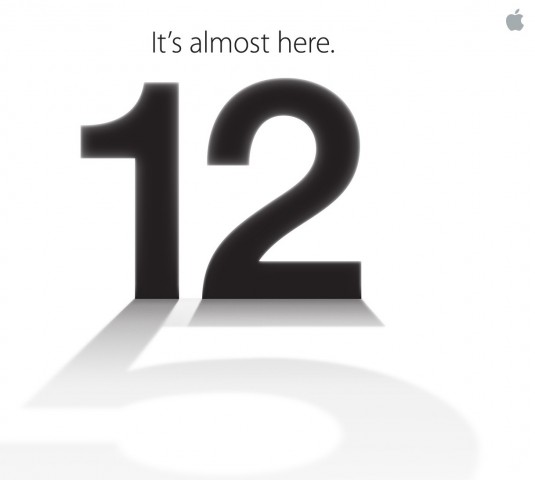
Number 12 casting a shadow of the number 5

Apple announced today that it will be holding a special event on September 12. Apple is rumored to announce a new iPhone, iOS 6 release data and possibly more. iOS 6 will include many accessibility enhancements including Guided Access. The new iPhone may include a better camera, faster processor and larger screen.

Come back on September 12 to hear all the new from Apple and how it effects the world of assistive technology.

Rabu, 08 Agustus 2012

BlackBerry Screen Reader Review


The BlackBerry Screen Reader is designed to make BlackBerry phones accessible to the visually impaired. BlackBerry Screen Reader is compatible with the BlackBerry Curve 9350, 9360, 9370, 9320 and 9220.

Installation is complicated and may require the assistance of a sighted person. Unfortutantly, BlackBerry Screen Reader is not built into the phone. There are two methods for installing the BlackBerry Screen Reader. The first method is to visit this webpage from your BlackBerry. Another option for installation is to plug the BlackBerry into your computer and then install the Screen Reader. Connecting your BlackBerry device to your computer is the most accessible option for installation.

Features
  • Physical Keyboard
  • Keyboard Shortcuts
  • Speak Everything On Screen
  • Free For Compatible BlackBerry Devices

Once installed  you will be greeted with a solid Screen Reader that makes the BlackBerry accessible. The visually impaired user benefits from the numerous physical buttons, including a full physical keyboard. Five buttons on the device are less tactile. These buttons include the answer, end, menu, back and end/off. While these buttons are flush with the device they are still used for the visually impaired once there location has been memorized. To be clear these buttons depress when pressed. The physical keyboard makes it possible to type eyes-free. Once you move away from the physical buttons and start navigating the screen, a text-to-speech voice begins speaking everything under your cursor. The BlackBerry I tested had a very loud speaker that made hearing the voice easy. To navigate the cursor you can use the trackpad. The trackpad is fairly sensitive so it may be best to turn down the sensitivity. Also, I found it helpful to turn on audible clicks when the cursor moves from one object to another. The BlackBerry Screen Reader also excels with the use of keyboard shortcuts. For example you can press a key combination to speak the time. Users can change the speech rate, verbosity and pitch.

Overall the BlackBerry Screen Reader is a solid screen reader that makes the BlackBerry accessible for visually impaired users. It is not as polished as other mobile screen readers such as Apple's VoiceOver. BlackBerry Screen Reader may not work with third party apps. Some work could be done in streamlining operations and stability. Also, the screen reader should be built into the BlackBerry from the start. Click read more below to view screenshots of the BlackBerry Screen Reader.


Device Provided Complimentary To Reviewer 


How To Use
  • Put the link on the
  • Generate Link box with http:// or https://
  • Use  CTRL + V  on keyboard to put the link.
  • Click Generate button to get encrypted link.
  • Click Copy URL button.
  • Done