MegaRid: blind
News Update
Loading...
Tampilkan postingan dengan label blind. Tampilkan semua postingan

Sabtu, 09 Agustus 2014

Redbox to Make Some Kiosks Accessible to the Blind

Redbox to Make Some Kiosks Accessible to the Blind


Popular video rental service Redbox agreed in a settlement to make 4,000 of their 35,900 kiosks located in California accessible to people who are blind or visually impaired. The service, which is commonly found in supermarkets and other public areas, is inaccessible to blind or visually impaired users. As part of the agreement, Redbox agreed to add headphone jacks, text-to-speech output, and tactile keyboards to kiosks. The roll-out of accessible video rental boxes will be gradual and is planed to take longer than two years. In the interim, Redbox has also agreed to provide phone support to help blind customers navigate the rental process. It is not clear if Redbox plans to add more DVDs with audio descriptions to benefit its new larger customer base of visually impaired users, but such a plan would seem to make sense. The settlement deal will inevitably increase Redbox's potential customer base by providing access to more people with disabilities. Unfortunately, the settlement seems to only cover a small fraction of Redbox kiosk in California. Hopefully, other kiosk companies will make their services accessible as well.

Kamis, 08 Mei 2014

Google's Project Ara Smartphone has Tremendous Accessibility Potential


Google's futuristic modular smart phone has the potential to dramatically change how we think of electronics. The still unreleased phone call Project Ara has a interior metal structure with slots for different components to connect. For example, modular components could house a camera, battery, touch screen display, or speaker. These components snap into place making a relatively standard looking smartphone. Consumers could purchase components and assemble them to make a personalized smartphone. The phone allows consumers to exchange a component for extra battery power or a more powerful camera depending on the situation.

With such customizable hardware, the Ara phone could adapt to fit the needs of people with various disabilities. If users have a hearing impairment they could add a louder speaker component. Conversely, if a user is deaf there is no need to waste space with a speaker when the space could be used for something more useful. The possibilities are almost limitless. A blind user could possibly opt not to have a touch screen display in favor of a refreshable Braille display. Users with dexterity challenges could add a tactile keyboard.

While Project Ara sounds promising for people with disabilities, the implementation is key. Will third party hardware developers make specialized components for people with disabilities at an affordable price? Can Google successfully configure Android to work properly with any assistive add ons third parties make?  Project Ara phones won't be available for for many months, but the project offers some exciting possibilities.


Click read more below to learn more about Project Ara.


Kamis, 17 April 2014

EU Regulation Requiring Hybrid and Electric Cars to Make Artificial Noise Will Improve Safety for Blind Pedestrians

EU Regulation Requiring Hybrid and Electric Cars to Make Artificial Noise Will Improve Safety for Blind Pedestrians


Hybrid and electric cars pose a major safety challenge for pedestrians. The cars, which use electric motors, make very little noise, making them almost impossible for blind pedestrians to detect. Electric cars are gaining in popularity due to their energy savings and improving affordability. In response to the increased threat quite electric cars are posing, the European Union (EU) is preparing to mandate electric and hybrid cars have noise alerts for pedestrians. By 2019 cars sold in the EU will be required to include audio alerts. While the implementation of the rule is still four years off the importance is sure to only grow as electric cars become more and more popular.

America has yet to require audio alerts for electric cars, but legislation has been proposed. Hopefully, the EU's changes will spur electric car makers to add audio alerts to their cars and improve the safety for pedestrians everywhere. As seen in the above video some cars such as Nissan's electric car already offers pedestrian alerts.

Sabtu, 08 Maret 2014

Any Developer Can Now Integrate Fleksy's Accessible Keyboard Into Their iOS App


Fleksy is an alternative keyboard for mobile devices including smartphones, tablets, and even smart watches. Fleksy uses predictive software that will guess which word you meant to type even if you mistype every letter. As long as your close to the right letters Fleksy will be able to correctly guess which word you meant to type. This means you don't even have to look at the keyboard. If Fleksy does make a mistake you can easily swipe through alternative suggestions.

Currently, Apple does not officially support third party keyboards to replace the default keyboard on iOS, but developers can get around this limitation by building an alternative keyboard into their app. Today, Fleksy made it easy for developers to built the Fleksy keyboard into their app. The Fleksy keyboard is now available for any iOS developer who wants to include it in their app. This announcement is very exciting because if developers get on board it will give iOS users the choice of which keyboard to use.

Having Fleksy integrated in apps is also a positive for blind and visually users. Fleksy works well with VoiceOver and because Fleksy is so good at predicting which word you are trying to type being able to see the keyboard is not as important. The Fleksy keyboard is much quicker and easier to type on then the default iOS keyboard especially for VoiceOver users.

Unlike Android were you can download Fleksy and use it will all of you favorite apps, each iOS developer will have to build in support for the keyboard. Hopefully, now that Fleksy is available for all iOS developer Fleksy will become ubiquitous on iOS. If you would like to see Fleksy integrated into one of your favorite apps you could contact the developer and ask for Fleksy integration.

To try out Fleksy download the app for iOS or Android. Fleksy is currently available in select apps such as Launch Center Pro. Click read more below to view images and videos of Fleksy.


iPhone Screenshot 2

iPhone Screenshot 3


Minggu, 23 Februari 2014

Launch Center Pro: Speed Up Common Actions on iOS Devices


blue icon with rocket ship in the middleLaunch Center Pro is an app for iPhone, iPad, and iPod Touch that allows users to launch apps and simple tasks directly from the app. Instead of launching Safari, navigating to the search site, and typing in your search, for instance, Launch Center Pro lets you directly search Google or Wikipedia; Launch Center Pro also can be configured  by users to set up group email, instead of having to type in the email address of each recipient.

Launch Center Pro uses a simple interface to make it easy to simplify some of your common actions and launch them quickly. I frequently text my sister "where are you?" Instead of launching the Messages app, finding my sister's contact, and then typing the message, I created a Launch Center Pro action that sends a text to my sister saying, "where are you?" Now, when I want to text my sister, I just touch the icon for this action and a text saying "where are you?" is on its way to my sister.
,
Creating actions is easy with the built in action composer which gives users the ability to pick pre-made actions for apps they already have installed on their device. The action composer also allows users to customize the icon of the action to make it easier to find.

Launch Center Pro works with a number of apps, but support for more useful actions among third party apps is hit or miss. Some apps such as Prizmo integrate very well with the app allowing you to easily launch actions, but other apps such as Nike+ Running can be opened, but not further interacted with. It would be nice to be able to start a new run in Nike+ via Launch Center, but actions like that requires the developer to build special support for Launch Center Pro into their apps. Click here to view a list of the apps currently supporting Launch Center Pro.

I see Launch Center Pro as a great app for first time iOS users, and other individuals who struggle performing sequential functions. Launch Center Pro can make it easier for first time iOS users learn to use their devices. Instead of learning how to search Google, Wikipedia, Yelp, and Google Maps individually a simple search menu could be made with quick links to search all those services. In terms of accessibility for the blind and visually impaired, Launch Center Pro works well with VoiceOver and supports the Fleksy keyboard which is accessible.

Launch Center Pro costs $4.99 for the iPhone version and $7.99 for the iPad version. Click here to view the app for iPhone and click here to view the app for iPad. Click read more below to view screen shots of Launch Center Pro in action.


App was provided complimentary to reviewer for review 

Selasa, 21 Januari 2014

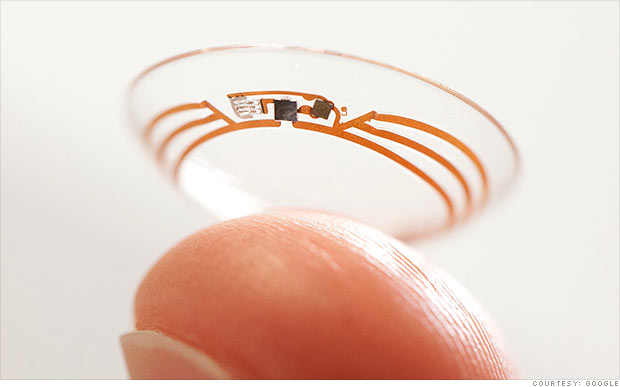
Google Smart Contacts May Help Monitor Blood Sugar in the Future


Google is rapidly developing new wearable technologies. Google's first attempt at wearable technology, Google Glass, has attracted a lot of press attention, but is still not available on the mass market. They also cost $1,500. Google's next foray into wearable technology maybe less flashy and less expensive, but may have a greater assistive technology impact.

Google's smart contact will sit on the eye like conventional contacts, but do much more. Google's initial idea is to measure blood sugar in tears for diabetics with electronics integrated into the contact. Instead of drawing blood to monitor blood sugar Google's smart contact would analyze blood sugar within tears. This system would eliminate or reduce painful finger pricks and also allow for more frequent testing. A small LED light inside the contact would then illuminate different colors depending on the blood sugar reading.

While this technology is still in development the idea is very exciting. If smart contacts could benefit diabetics maybe Google can adapt them to benefit people with other disabilities or conditions. Could a contact detect sound and give a visual notification to a deaf user? Imagine this, a smart contact for the deaf senses volume of sound and direction and notifies the user. A loud sound off towards a user's right side would illuminate the right LED very brightly while a soft sound off towards a user's left would dimly illuminate the left LED. While Google has only confirmed smart contacts are in testing for blood sugar testing it is exciting to think about the possibilities five or ten years down the line. Hopefully smart contacts for blood sugar monitoring will reach the market sooner than later and will assist people with diabetes.

Click read more to view a short video about Google smart contacts.


Microsoft and GW Micro Team Up to Offer Window-Eyes Free to Office Users

Microsoft and GW Micro Team Up to Offer Window-Eyes Free to Office Users


GW Micro, the makers of the Window-Eyes screen reader, has teamed up with technology giant Microsoft to offer Windows-Eyes to Microsoft Office 2010 and newer users for free. Windows-Eyes can read elements on the screen aloud allowing the blind, low-vision, and print disabled to have full access to their Windows PC. Window-Eyes can also output on-screen content to a Braille display for users who prefer Braille. This new partnership will increase the affordability of Window-Eyes and allow more people to benefit from its features. Window-Eyes normally costs almost $900 while Microsoft Office costs far less. GW Micro and Microsoft believe this new partnership will allow millions of new users to access their computers using Window-Eyes. Rob Sinclair, Microsoft's Chief Accessibility Officer says the following about this new program,
"By partnering with GW Micro in this endeavor we are demonstrating Microsoft's onging commitment to provide all of our customers with the technology and tools to help each person be productive in both their work and personal lives."
This announcement is very significant in the world of assistive technology. This deal will allow millions of users to increase the usability of their computers for free if they already own Microsoft Office. Owners of Microsoft Office 2010 or higher can download Window-Eyes by visiting WindowEyesForOffice.com and following the instructions on screen.
How To Use
  • Put the link on the
  • Generate Link box with http:// or https://
  • Use  CTRL + V  on keyboard to put the link.
  • Click Generate button to get encrypted link.
  • Click Copy URL button.
  • Done