MegaRid: dyslexia
News Update
Loading...
Tampilkan postingan dengan label dyslexia. Tampilkan semua postingan

Senin, 15 Februari 2016

New Add-On for OneNote Benefits Students with Dyslexia


Microsoft OneNote Icon
Microsoft recently made a new add-on available for its OneNote software which aims to help students with dyslexia. The add-on works within Microsoft's note taking software and is currently available to download as a beta. Once installed, a new tab appears which gives users the option to read content using text-to-speech or dictate using speech-to-text. While both of the features have been available before it is nice to have a free option that can be used directly within OneNote: an application that many schools and parents already have installed as part of the Microsoft Office suite.


The text-to-speech reader mode is called "immersive reading mode" and includes some handy features. When activated the reader fills the entire screen with text from your OneNote notebook. While reading text is highlighted as it is read aloud. Users have the option to change the background color and text size in order to create a more comfortable reading experience. The add-on also includes the ability to highlight nouns, verbs, and adjectives in different colors; a feature that could be helpful for younger students. Microsoft even includes the ability for users to break words up into syllables.

It is exciting to see the fruits of Microsoft's enhanced accessibility initiatives. While the new features are not novel they seem easy to learn. Since the "Learning Tools" are free for OneNote users and easy to learn they may prove to be a great starting point for people new to assistive technology. Microsoft seems to be increasing their focus on accessibility. Recently, the company announced a new Chief Accessibility Officer and a reorganization of accessibility teams. Hopefully, with the new reorganization, "Learning Tools" is just the beginning of Microsoft's accessibility improvements.

The "Learning Tools" add-on available as a free download for Windows. Click here to learn more and download the add-on.

Jumat, 09 Januari 2015

Keeble Keyboard for iPad: Flexible Text Input for Users with Special Needs


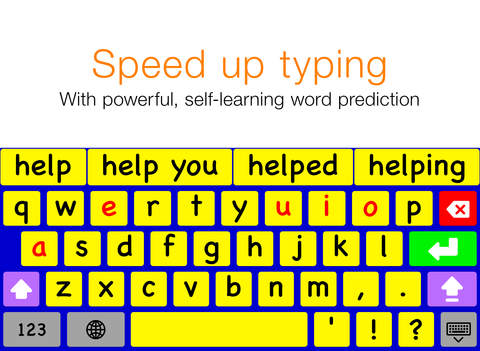
Keeble is a virtual keyboard for iPad made by AssistiveWare. The app is only available in English for iPads running iOS 8 and above. As a result of new features available in iOS 8 the Keeble keyboard can be used in almost every app on the iPad including mail, Safari, and messages. Keeble gives users a number of customization options to make text input easier for users with special needs such as motor challenges, dyslexia, and other disabilities.

One option available is the ability to change the appearance of the keyboard. Users can change the color of the keyboard which could be helpful for users with visual impairments. The higher contrast colors can be more easily seen compared to the white and gray colors of the default iOS keyboard. The layout can be change from a QWERTY layout to an ABC layout if desired.


Keeble also includes word predication to speed up typing; especially for Switch Control users. The word predication features is slightly more advanced than iOS 8's built-in word prediction. Keeble allows users to change the number of predictions offered above the three offered by the default iOS 8 keyboard.

Keeble also allows users to change how the keys respond to taps and presses. This is especially useful for users with motor challenges that may cause accidental taps or presses on unwanted keys. Hold duration can be set to change how long a key must be held before that character is entered. With this option enabled, quick accidental taps will not be registered. Additionally, the backspace repeat can be customized to avoid accidentally deleting text. A "select on release" option is also available which will enter text on release of a key instead when the key is pressed.

The last customization option allows users to turn on spoken feedback of the text they type. Feedback can be given letter by letter, word by word, and/or sentence by sentence. This feature allows people with dyslexia or poor spellers to confirm that what they words they think entered are the words that they hear being spoken back to them using text-to-speech. While this feature is useful it can only be enabled and disabled via the apps settings. If there was an option to turn on and off auditory feedback directly, it would be much easier to access the feature when needed and disable the feature when not needed. Users can totally turn off the iPad's speakers but this will also mute all other audio output. There is space on the bottom right of the number and symbol entry keyboard where quick access to this setting could be added.

The Keeble app costs $15 on the App Store. To download the app click here. Click read more below to view screenshots of the Keeble keyboard.


Kamis, 19 Juni 2014

Kindle App for iOS and Android Adds Whispersync for Voice


Amazon's Kindle app for iOS and Android was recently updated to integrate audio books from Audible. The update, which is available for free, allows users to seamlessly switch between reading the Kindle text version of a book to listening to the Audible audio version of a book. For example, if you read part of the book and then switch to the audio version the recording will pickup right where you left off. The new feature even allows users to listen to the audio book while following along with the text version. Audio speaking rate can be increased or decreased according to user preference. Unfortunately, unlike Immersion Reading on Kindle Fire tablets, the Kindle app for iOS and Android does not highlight the text as it is being read allowed. While this may not be an inconveniences for some users, it could be a major omission for users with tracking difficulty. For now, users will need a Kindle Fire tablet to take advantage of the full Immersion Reading experience. To learn more about Immersion Reading click here. There is one another major caveat: price. In order to take advantage of Whispersync for Voice or Immersion Reading on a Kindle Fire, you must purchases both the Kindle and Audible versions of a book. This can become extremely expensive for the occasional reader let alone a book worm.

To download the app for iOS click here and to download the app for Android click here. To view screenshots of the app in action click read more below.


Rabu, 01 Januari 2014

PDF Expert 5: Well Designed PDF Management App with Text-to-Speech


PDF Expert 5 is a well designed PDF management app for the iPad. The app includes many useful features that allow you to read, edit, and annotate PDF documents easily. Unlike some other feature -rich apps, PDF Expert 5 does not feel cultured. The elegant design makes the app easy to use. PDF Expert is an assistive app because of its text-to-speech integration with the added benefit of extra features.

One caveat, while the app is good for non-disabled and dyslexic users, I would not recommend the app for VoiceOver users because of some VoiceOver problems I have found. Readdle, the maker of the app, should work on fixing these VoiceOver problems so blind and visually impaired can also benefit from the app. 

PDF files can be imported from numerous cloud storage services including Google Drive, Drop Box and SkyDrive or using the "open-in" feature of many other iOS apps. You can also view other file types, but the built in text-to-speech reader is only available for PDF documents. Files can be organized into folders or dragged and dropped into different sections.

PDF Expert's text-to-speech function works with any PDF with digital text. It does not work with PDF documents that have text within images. To read a compatible PDF, turn on text-to-speech in the reading mode menu and then press play. You can start reading at the middle or end of a page by highlighting a word and pressing "read from here." Text is read with the default iOS voice that many may recognize as the voice of Siri. Unfortunately, you cannot purchase additional higher quality voices. The app also requires you to re-enable text-to-speech every time you switch PDF documents. This is inconvenient if you switch are between PDF documents quickly.

Click read more below to continue reading about PDF Expert.

Viewing a PDF document is also a breeze. PDF Expert includes a quick scrolling mode and thumb nail view to allow you to easily navigate large PDFs. You can also change the background to sepia or night for easier viewing.

Aside from the text-to-speech features PDF Expert includes a number of editing and annotation features. Annotation options include highlighting, underlining, shapes, strike-through, stamps, signatures, and text. These annotation options are intuitive to use and you can easily can the color of highlights and other annotations. If you would like to add text to a PDF document you do not need to worry about overlapping any original text because the app automatically wraps your text so it will not overlap. Unfortunately, the app will not read your text annotations back to you using the built in reader, but you can always use the built in Speak Selection feature.  

PDF Expert also includes a review mode which allows you to edit and markup existing PDF documents. To learn more about this feature see the below video.

With PDF Expert's easy to use annotation and editing features and its built in text-to-speech reader PDF Reader is an ideal app for any iPad user who wants increase productivity. PDF Expert 5 is compatible with iPads running iOS 6 or higher and is available for $9.99 in the App Store.


Minggu, 29 Desember 2013

Use If This Then That (IFTTT) to Automate Simple Tasks

Use If This Then That (IFTTT) to Automate Simple Tasks

If This Then That (IFTTT) is a simple app for iPhone and Android that allows you to automate simple tasks. If you want to email every picture you take to your grandparents or tweet about every breaking news story IFTTT can do it for you automatically. The IFTTT app integrates with many other apps and services which allows it to help with a variety of  tasks. IFTTT can integrate with reminders, contacts, photos, messages, Twitter, Google Drive, Facebook, Blogger, Evernote, and many more services.

To start using the app you can choose from hundreds of pre-made recipes or make your own. A recipe could say " If I post a new post on Blogger, tweet its title and a link, "or  "when I arrive at school,text my mom" The app constantly checks your recipes and completes the action at the correct time. It reduces the need to do many monotonous tasks. It also bridges the gap between different web based services allowing you to spend more time using the services and less time managing your digital life.

IFTTT also integrates with certain connected home systems. Using IFTTT in concert with the WeMo connected home platform you can have your lights turn on automatically when you get close to home or turn off the TV when you are far from home.

Some of these recipes can be helpful for people with executive functioning difficulties. For example, the app can automatically check the weather, and if it is going to rain remind you to wear a jacket. The possibilities are almost endless because of the customization the app offers. The app can also complete actions based on your location. You can set up the app to call, email, or text message someone when you arrive or leave a certain location. This could be helpful for parents who need to makes sure their kid has arrived to school safely in the morning. For example, you could set your childs iPhone to email you everytime they arrive or leave school.

IFTTT has an iOS app and website both are free of charge. Click read more below to view screen shots of the IFTTT app in action.


Minggu, 10 November 2013

Bookshare Offers Free Membership to Disabled Veterans Attending School

Bookshare Offers Free Membership to Disabled Veterans Attending School


Bookshare recently announced that they will be providing free membership for disabled veterans who are currently attending a United States college or university. Bookshare also serves disabled civilian students and others with print disabilities by providing free downloadable accessible books. Veterans who qualify, but are not enrolled in school will have access to a 30 day free trial. After the trial veterans continue using Bookshare for a $50 yearly membership fee. Especially on Veterans Day it is great that veterans who are disabled will be able to access over 215,000 accessible books from the Bookshare library. Bookshare's press release says,
"Accessible books can break down reading barriers and open a new lifeline to reading to go back to school, learn a new vocation or read for pleasure."
A membership provides an individual with electronic books that can be read with text-to-speech or used with a braille device. This makes reading possible for people who are blind, low vision, physically disabled, or dyslexic. Interested veterans can find more information by visiting Bookshare's veterans site. People interested in Bookshare who are not veterans can visit Bookshare.org.

Jumat, 20 September 2013

New in iOS 7: Redeem iTunes Gift Cards with the Camera


Apple’s new mobile operating system for iPhone, iPad, and iPod Touch includes the ability to redeem iTunes gift cards with the camera instead of manually typing long codes. To redeem a gift card with the camera go to the iTunes Store, App Store, or iBooks Store and hit redeem at the bottom of the featured page. Then choose to redeem the gift card with the camera. You can use either the front facing or rear facing camera. To redeem the gift card just point the camera at the back of the gift card and the code is automatically redeemed. This new feature makes it possible for the blind and visually impaired to redeem gift cards without sighted assistance. Also, iOS 7 eliminates the need for sighted users to type in long and complicated codes. iOS 7 is available now for iPhone, iPad, and iPod Touch.

How To Use
  • Put the link on the
  • Generate Link box with http:// or https://
  • Use  CTRL + V  on keyboard to put the link.
  • Click Generate button to get encrypted link.
  • Click Copy URL button.
  • Done