MegaRid: iOS Access
News Update
Loading...
Tampilkan postingan dengan label iOS Access. Tampilkan semua postingan

Selasa, 21 Juli 2015

Inspiration Maps Updated with iPhone Support and More

Inspiration Maps displayed on iPhone 6

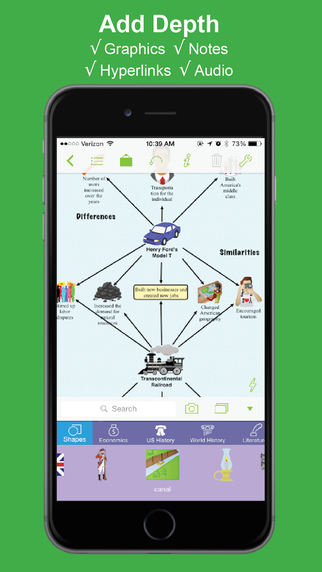
Inspiration Maps iconThe mind mapping and outlining app Inspiration Maps, which was previously only available on the iPad, is now available on the iPhone as well. The app is a valuable tool to help students organize their ideas and start the writing process. Users can drag text boxes around the screen to easily produce webs of ideas. Inspiration Maps is particularly helpful when writing about complex topics that require a well planned and organized essay. Inspiration Maps can be also be helpful when beginning an essay to visualize the structure that the written piece will take.

With the larger screen iPhone 6 and iPhone 6 plus in makes sense to bring the app to the iPhone. If you are concerned about not having enough room to effectively use the app on your iPhone, a free version is available here.

The update also makes in easier to select multiple text boxes or images at the same time. Now users can press and hold on the screen in order to lasso a group of images.

The updated app is available for $10 is the App Store. Click here to download the app. Click read more below to view more screenshots of Inspiration Maps for iPhone.


graphic highlighting brainstorming

screenshot showing ability to add graphics, notes, hyperlinks, and audio

screenshot showing the ability to flip between web and outline view

Jumat, 20 Juni 2014

Happy Birthday VoiceOver

Happy Birthday VoiceOver


Five years ago, Apple did what seemed impossible; making the smooth glass of the iPhone touch screen accessible to the blind. A seemingly impossible task made possible by one of Apple's greatest software innovations; at least in my mind and the minds of millions of others with disabilities. Apple's solution was VoiceOver, a screen reader like no other before. VoiceOveruses touch gestures instead of keyboard shortcuts and other more desktop friendly inputs that had been used before. Simply put, VoiceOver allowed millions of blind and visually impaired users to experience the magic that was iPhone. In some ways, VoiceOver is to accessibility as the Model T was to transportation: both brought new opportunities to the masses.

VoiceOver has come preinstalled on every iPhone, iPad, and iPod touch for the past five years. Blind and visually impaired users can purchase a device off the shelf and have access almost immediately. Apple often says “built-in, not bolted on” when talking about accessibility which is definitely accurate in respect to VoiceOver. Thanks to VoiceOver blind and visually impaired users were as much a part of the smartphone revolution as any other user group. Over the past five years Apple has refined and updated VoiceOver and has added new accessibility features to help users with a wide variety of disabilities. Apple devices pushed the entire smartphone and tablet market to become more accessibile to more people.

The inclusion of VoiceOver and other built-in accessibility features has allowed the App Store to boom with assistive apps to help the needs of people with disabilities. Not only did VoiceOver show that accessibility was possible on a touch screen phone, it gave developers a foundation to build great accessible apps. Basically, VoiceOver created a customer base for apps that helped the blind, which drove demand and increased the supply of great accessible apps. Another app gold-rush of sorts, but this time with apps tailored to people with disabilities. These apps are opening up new possibilities for disabled iOS users.

On this fifth birthday of VoiceOver, Apple continues improve its accessibility offerings. Apple Keynote events routinely focus on a person with a disability being aided by an Apple product; it is clear that Apple cares about accessibility. New accessibility features come with every release of iOS, allowing users with different needs to get the most out of their device. However, no software is bug free and users are encouraged to email accessibility@apple.com with suggestions or comments. And a many developers still do not support accessibility features in their apps. It can go a long way for users to tweet or email a developer asking for enhanced accessibility features. With Apple releasing “new product categories” within the year as CEO Tim Cook is often heard saying, hopefully accessibility remains at the forefront. VoiceOver has opened doors for millions of blind and low vision users, what other five-year-old can say that?

Happy birthday VoiceOver!
How To Use
  • Put the link on the
  • Generate Link box with http:// or https://
  • Use  CTRL + V  on keyboard to put the link.
  • Click Generate button to get encrypted link.
  • Click Copy URL button.
  • Done