MegaRid: special education
News Update
Loading...
Tampilkan postingan dengan label special education. Tampilkan semua postingan

Jumat, 20 Juni 2014

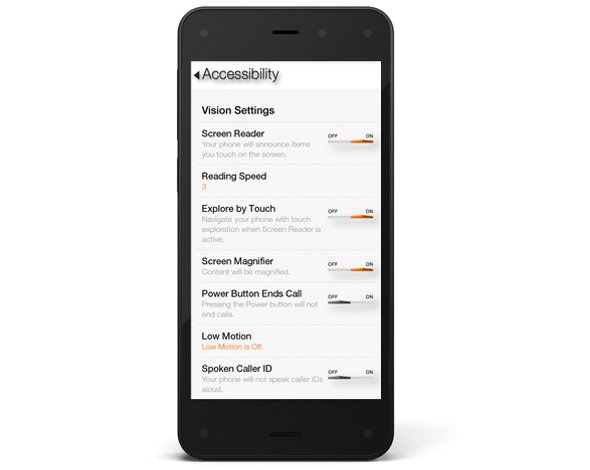
Amazon Announces Fire Phone with Advanced Image Recognition and Built-in Accessibility
Courtesy: Amazon.com

This week, Amazon announced there first smartphone called Fire Phone. The Fire Phone has a number of flashy, maybe even gimmicky, features along with a few features that may have serious accessibility implications. The phone which starts at $200 and starts shipping on July 25th runs Fire OS 3.5.0 similar to Amazon's Kindle Fire tablets. The operating system includes a number of built-in accessibility features including features to help blind, low vision, mobility impaired, and hearing impaired users. For blind and low vision users, the Fire Phone includes a screen reader which allows users to navigate the screen without seeing it. Assuming the Fire Phone uses the same text-to-speech voices as the Kindle Fire tablets, the text-to-speech voice used is very high quality. For low vision users, the Fire Phone includes a zoom mode and high contrast support. Closed captioning, mono audio, and hearing aid compatibility (HAC) are features included for users with hearing impairments.The Fire Phone also includes features for users with mobility challenges including dictation and improved one-handed usability. It is very encouraging to see Amazon include accessibility features in to their Fire Phone. Click here to read a full overview of all the Fire Phone's accessibility features. Amazon, once reluctant to support accessibility, has shown a new dedication to accessibility for users with disabilities. Hopefully, this continues in future updates to the Fire OS as well as to future products.

In addition to dedicated accessibility features, the Fire Phone has a couple of mainstream features that could be potentially beneficial to people with disabilities. The first of these features is called Mayday. Mayday is currently available on newer Kindle Fire tablets allows users to quickly connect and chat with technical support directly from their device. Simply by pressing the easy to access Mayday button users are atomically connected. Technical support staff can access certain device functions to assist users with a variety of questions. Support staff can even virtually draw on the screen to draw your attention to certain buttons. In my testing, I was able to connect with Mayday staff in under a minute and the staff was knowledgeable and friendly. The support personnel were even knowledgeable about accessibility features. This feature could be great for users with cognitive challenges who need assistance using certain features on their phone.

The second feature is called Firefly. By pressing a dedicated button on the side of the device and pointing the camera at an object the Fire Phone can identify that object. Amazon demonstrated this feature at their even and it worked very quickly. Firefly could be used by the blind to identify objects and differentiate objects of similar size and shape. For example, to identify if a can contains chicken soup or sliced peaches. Similar to iOS apps like TapTapSee, Firefly is Amazon's attempt to make buying merchandise through Amazon an easier process.

The Fire Phone seems promising, but it is impossible to determine its true value in terms of accessibility until it is released next month. Until then, click read more to view videos of the Fire Phone in action.






Senin, 02 Juni 2014

iOS 8 Accessibility Roundup: More Accessible Than Ever

Credit: Apple
Credit: AppleToday, Apple previewed iOS 8, the next operating system for iPhone, iPad, and iPod touch. iOS 8 builds on existing accessibility features to offer some exciting new possibilities for iOS users with disabilities. Many websites will have general information about iOS 8, but this post will focus on accessibility related changes to iOS. iOS 8 includes new keyboard options, improved text-to-speech voices, improved Guided Access features, and improved Siri functionality among other accessibility related features. Apple can always add or alter features before the general release. The new operating system will be available this fall for the general public.

QuickType and Keyboard

Apple's iOS 8 will include a built in predictive keyboard called QuickType. This new software keyboard will predict words for the user as they type. Once the word you want to enter appears in the suggestion bar above the keyboard, you simply tap it to insert that word. This feature will cut down on key strokes needed to enter words which will benefit people with dexterity challenges. QuickType even takes context into account so if your typing an email it will suggest more formal language that if you are writing a text message. QuickType will be similar to the Co:Writer app, but will work across all apps on your devices.

In addition to Apple's own QuickType keyboard, iOS 8 will allow third-party developers to develop keyboards for system wide use. For example, Fleksy could be updated to work with every app on the iPhone or iPad. This flexibility gives users with different abilities the opportunity to switch keyboards to one that fits their needs. For users who are blind or visually impaired downloading the fast and accessible Fleksy keyboard may allow them to more easily enter text.

Health

iOS 8 takes big steps to help people manage data associated with their health. Users can input data into the health app through third-party health monitoring devices like a blood pressure reader or through apps. This data can then be automatically shared with doctors and other health care professionals to help insure timely and appropriate care. For instance, if a blood pressure or glucose reading was outside of a normal range, a doctor could be automatically alerted. This could help people with chronic conditions live more independently especially in their later years.

The health app will include another life saving feature called "in case of emergency card." This information card will be accessible from the lock screen and will allow first responders and emergency room doctors important health information in the case of an emergency. The card can include a photo, medical conditions, allergies, current medications, and more all to give life saving information to emergency medical personnel.

Credit: Apple

Family Sharing

Family sharing will allow families with multiple iOS 8 devices to manage their iOS devices more harmoniously. Parents will be able to set up home sharing to monitor their child's physical location or to share purchased content from the iTunes store among members of the family. Children will also have to ask parents permission before purchasing an app.

Spotlight Search

Spotlight search is an existing feature in iOS 7, but in iOS 8 it gets supercharged. Spotlight in iOS 8 will give Siri-like answers. Unlike Siri, which uses voice input, spotlight uses text input. This new form of input gives users with speech impairments the ability to type, instead of speak, queries and get meaningful results.

Touch ID

iOS 8 improves Touch ID by allowing third-party apps to unlock information using just a user's fingerprint. Touch ID is currently used for unlocking your device and making iTunes purchases. This feature already is great for blind users because it offers secure authentication without having to type, which can be a slower process with VoiceOver. In iOS 8, the ability to access third-party apps with just a finger print will expand on the already very accessible Touch ID feature of iOS 7.

Siri
iOS 8 will also bring improvements to Siri. Most notably, users will be able to activate Siri hands-free by saying "Hey, Siri." This new hands-free voice command may benefit people that have trouble activating the home button. This always listening feature is similar to Google's advanced voice search.

iOS 8 will also offer faster dictation that appears on screen as you speak. This new feature will prusumably work with Siri and in app dictation.

Much More
Credit: Apple

iOS 8 will also include features that Apple did not have time to fully preview during their keynote. The first one included in the keynote was "Braille Keyboard for direct 6-dot Braille input." Other accessibility related features include the ability to use the advanced and high quality Alex voice. The Alex voice is currently available for the Mac and many users enjoy its high quality. iOS 8 will also include improved zoom for accessibility, but no further details on this feature where offered.

iOS 8 will also include some enhancements to Guided Access. Guided Access is a feature that locks a user into a single app. This is great for teachers administering tests on an iPad or parents of kids who are easily distracted. In iOS 8, users will be able to use Touch ID to exit from Guided Access. Users will also be able to use time limits and countdown timers to control Guided Access.

Another feature listed is "Speak screen," a somewhat mysterious feature than did not garner any further explanation from Apple. Speak screen may be a brand new accessibility feature or maybe unrelated to accessibility, but the name seems to imply some link to accessibility.

Sabtu, 15 Maret 2014

Voice Dream Reader Updated to Version 3.0: Read PDFs in Original Layout and More


Voice Dream Reader is an app for iPhone, iPad, and iPod Touch that supports people who prefer reading in different ways. Voice Dream can read documents from a number of sources with multiple high quality text-to-speech voices. Users can import PDFs, Word documents, text files, webpages, and even Bookshare books into the app. Once the text is loaded into the app you can listen to it using text-to-speech, highlight the text, search for a specific words or phrases, and get definitions for unknown words. Among many other uses, Voice Dream Reader is a terrific Bookshare book reader for students. Voice Dream also works very well with VoiceOver. Now, with newly released Voice Dream Reader version 3.0, new features have been added that makes the app even more useful.

Up until yesterday evening, Voice Dream only supported text. All images and formatting associated with a file were stripped away. With version 3.0 images and formatting within PDF files are retained. Now you can read a PDF in its original layout. Voice Dream still highlights each word as it is read aloud. It is easy to switch between layout view and text view depending on your preferences. Version 3.0 also includes more customization options. Users now have more control over the colors of the highlighting and spacing of the text. An improved web browser has been added that makes adding text from the web quicker and easier. New Ivona text-to-speech voices are also available for purchase in version 3.0.

With large PDF files page loading is slightly slow, but this problem only occur with very large files and does not effect text view performance.

In future updates image support maybe added for Bookshare books or other document types. I also hope iCloud sync will be added in a future update. At school I read my books on my iPhone and make new annotations, but when I get home and start reading on my iPad the annotations are stuck on the iPhone and I must search for the page that I left off on. iCloud sync would make this process much more seamless.

Voice Dream Reader is a must have app for iOS users with print disabilities or anyone who could benefit from reading with text-to-speech. Voice Dream Reader's well developed features make loading, reading, and annotating text easy. Knowing that the app has a developer that is open to feedback and actively developing new features is an added benefit. Voice Dream Reader costs $9.99 on the App Store. Click here to download the app. There is also a lite version of Voice Dream Reader that allows you to try it before you buy.

Click read more to view screenshots of Voice Dream Reader.


Senin, 25 November 2013

Livescribe 3 Smartpen: Do More With Your Written Notes


By combining the ease of hand writing, the power and accessibility of Apple's iOS devices, and audio, the Livescribe 3 Smartpen is a powerful tool.  With the smartpen you can start writing on a pad of paper and see your handwriting appear on your iPad or iPhone almost instantly.

When taking notes It can record audio that is linked to your handwriting, allowing you to easily hear what was happening exactly when you were writing.  It can easily search through notebooks of handwritten pages to find the right note in an instant, and it allows you to share your notes with anyone without copying or scanning.

The Livescribe 3 Smartpen is not just a refinement of last year's Sky Wifi Smartpen. The Livescribe 3 Smartpen adds new functionality by pairing it with an iPhone, iPad, or iPod Touch. The Livescribe 3 is still capable of syncing handwriting and audio, but instead of recording the audio from a built in microphone, the recording happens on an iPhone or iPad paired to the pen with Bluetooth. With the pen connected to an iOS device using Bluetooth, features like handwriting recognition and cloud based storage options are handled by the iOS devices. Most of the pens functionality is handled with the free Livescribe+ app that seamlessly manages the Smartpen.

Read on to find out more about the Livescribe 3.

Hardware and Requirements

The Livescribe 3 is a sleek and streamlined device that is about the same size as some thicker standard pens. The pen twists open to reveal the ball point tip. No more forgetting to turn on your pen, it turns on automatically when the tip is out. At the bottom is a special camera that allows the pen to track its location on the page. At the top of the pen is a stylist tip. The stylist tip hides a micro-USB charging port. Speaking of charging, Livescribe claims the pen gets 14 hours of battery life. At the top there is also an indicator light that shows the status of the pen. The Livescribe 3 uses advanced Bluetooth to connect to the companion app. The pen only supports Apple devices because they have the widest compatibility with the new Bluetooth standard. Livescribe may support Android devices when advanced Bluetooth is more widely available. The pen is compatible with iPhone 4S and newer, iPad 3rd generation and newer, and iPod Touch 5th generation. The companion app requires iOS 7.

The Livescribe 3 requires a special dot paper that Livescribe sells on their website. Some may think of this a negative, but the Livescribe notebooks come in a variety of sizes and are competitively priced.

Livescribe+ App

The Livescribe+ app is the brains of the Livescribe 3 smartpen. The pen sends your notes to the app over Bluetooth and then processes the handwriting and turns it into digital text. The app makes it easy to review notes in a page view or list view. Because the app turns handwriting into digital text, it is simple and fast to search through your notebook. You can search by keyword and easily find all associated notes. Once your handwriting has been converted to digital text you can use the built in iOS Speak Selection feature to have your note read aloud with text-to-speech.

The handwriting recognition was amazingly accurate even with my sloppy handwriting and if it does make a mistake you can manually correct it. If you write down a phone number or an address you can save the information as a contact with one tap. If you write down a homework assignment you can save it directly into your Reminders list which is a nice touch. Using an iOS device as the brains of the smartpen allowed Livescribe to remove the screen, speaker, microphone, and wifi which considerably slimmed down the pen. Using an external microphone eliminates the writing noise that the Sky Wifi Smartpen picks up.

Taking the microphone out of the smartpen does not come with out compromise. Because the smartpen relies on the iOS devices microphone you can not record audio without an iOS device nearby. You can still capture your written notes and sync them next time you have your iOS device handy. For some who don't always have their device close by, but still want to record audio the Sky Wifi Smartpen is a great option. If you always have your device close by this won't be an issue.

Sharing your notes is one area where the Livescribe+ app really shines. Using the standard iOS 7 share sheet you can share your notes to any app that supports PDFs. This includes Evernote, Dropbox, Google Drive, and many others. Currently recipients of your documents that don't own an iOS 7 device can only view your handwriting and cannot play back the audio and linked notes known as a pencast. It is really unfortunate that the ability to view pencasts on desktops and Android devices was not present at launch. 

Benefits

The Livescribe 3 can benefit many people who need to keep useful notes for work or school. It can be especially useful for students with learning disabilities who struggle to take or keep notes. For example if a teacher is talking about graphing points and the student gets distracted, he can easily go back in his notes and listen to the audio at a later time.

Teachers and special educators who have multiple students who get class notes provided as an accommodation can easily use the Livescribe+ app to share the note instantly with everyone in the class. This eliminates the need for hard-to-read carbon paper or delays due to photo copying. For people who struggle with organization, the ability to search for notes maybe enough of a reason to purchase the pen. Using a conventional ball point pen for writing is much easier than using a stylus to write on an iPad. The Livescribe 3 gives you the ability to write with a ball point tip while still getting all of the benefits of having your notes on your iPad.

Possibilities

The Livescribe 3 Smartpen and Livescribe+ app have really solid features that have benefits right out of the box. If you decide to buy the pen you should decide to because of the features currently available, but with very capable hardware and the flexibility of an iOS app Livescribe could and should continue to improve the product. One feature that I would like to see added is the ability to speed up and slow down audio playback. Variable playback speed makes it easy listen to more audio in less time. With the Sky Wifi Smartpen this was an option, but it is not currently available in the Livescribe+ app. Audio transcription is another feature that would be a great addition to the Livescribe+ app. Imagine listening to a lecture and having the entire text transcript of the professor even if you weren't able to write everything down.  With improving speak recognition software this feature is probably technically possible.

Pricing and Availability

The Livescribe 3 starts at $150 for the starter edition. A pro edition with a darker finish, larger leather starter notebook, replacement ink, one year premium Evernote access sells for $200. Both editions are avalible from Livescribe's website.

Videos and Images


Device was provided complimentary to reviewer

Sabtu, 26 Oktober 2013

Apple's Announcements Impact on Accessibility


This week Apple announced a variety of new hardware and software products at media event. While Apple executives didn't devote stage time to accessibility announcements as they have in years past, the announcements still impact accessibility and assistive technology.

Mac

Apple previewed OS X Mavericks at their World Wide Developers Conference (WWDC) in June. This week Apple released the Mac operating system to the public and announced that it would be a free update. Like iOS 7, Mavericks includes some exciting accessibility improvements including enhanced dictation and Switch Control. Click to read more about each new feature.

iPad
The main focus of the event was updated iPads. Apple released a new full size iPad named iPad Air. The iPad Air is considerably thinner and lighter than the previous full size iPad. In addition to the slimmer design Apple included the new A7 processor which increases performance. The iPad mini was also updated to include a higher quality retina display and is now called the iPad mini with Retina display. Notably, the new iPads don't include Apple's new Touch ID finger print sensor that debut on the iPhone 5s.

Updated Apps

Apple updated their iLife and iWork software for both the Mac and iOS devices. The updates have some useful new features, but I have not found any new accessibility features in these updates. Notably, Apple's education focused iOS apps iBooks and iTunes U were not updated. I'm hopeful that these apps will be updated soon and include new features. In particular, I hope Apple adds improved text-to-speech integration for iBooks. In particular I hope a "read" or "speak" button will be added to allow continuous text-to-speech with highlighting for all books. Currently continuous text-to-speech with highlighting is not possible in iBooks. 

iOS 7.0.3

iOS 7.0.3 is a minor update to iOS 7 but the new release includes a few accessibility improvements. In iOS 7.0.3 the reduce motion accessibility setting decreases navigation animations. This is designed to limit motion sickness that some users reported after updating to iOS 7. iOS 7.0.3 also includes VoiceOver fixes for a sensitivity issue that was present in previous versions of iOS 7.

Selasa, 15 Oktober 2013

Apple Announces October 22th Event Likely to Foucs on new iPads and More

Apple Announces October 22th Event Likely to Foucs on new iPads and More


Today Apple sent invitations to members of the media for an October 22th event. The event comes just weeks after the release of the iPhone 5s and iPhone 5c. Rumors have suggested that the event will focus on an updated full sized iPad and an updated iPad mini. The full size iPad will likely feature a new design with smaller side bezels similar to the iPad mini's design. It is also possible that the new iPad models will include some of the new features found on Apple's latest iPhone possibly even the Touch ID finger print sensor. Of course all of this remains speculative until Apple officially confirms the details. If you are in the market for a new iPad it is difinitely recommended to wait and see what Apple will announce next Tuesday.

Jumat, 20 September 2013

New in iOS 7: Redeem iTunes Gift Cards with the Camera


Apple’s new mobile operating system for iPhone, iPad, and iPod Touch includes the ability to redeem iTunes gift cards with the camera instead of manually typing long codes. To redeem a gift card with the camera go to the iTunes Store, App Store, or iBooks Store and hit redeem at the bottom of the featured page. Then choose to redeem the gift card with the camera. You can use either the front facing or rear facing camera. To redeem the gift card just point the camera at the back of the gift card and the code is automatically redeemed. This new feature makes it possible for the blind and visually impaired to redeem gift cards without sighted assistance. Also, iOS 7 eliminates the need for sighted users to type in long and complicated codes. iOS 7 is available now for iPhone, iPad, and iPod Touch.

How To Use
  • Put the link on the
  • Generate Link box with http:// or https://
  • Use  CTRL + V  on keyboard to put the link.
  • Click Generate button to get encrypted link.
  • Click Copy URL button.
  • Done