MegaRid: visually impaired
News Update
Loading...
Tampilkan postingan dengan label visually impaired. Tampilkan semua postingan

Minggu, 28 Desember 2014

KNFB Reader App: Amazingly Fast and Accurate


The KNFB Reader is a text recognition app that is shockingly fast. Take a picture of a newspaper article or practically any printed text and within a couple of seconds the app will be reading the text back to you. A "couple of seconds" is no exaggeration, the KNFB Reader app is that fast. For people who are visually impaired or have difficulty reading, the KNFB Reader is perfect for accessing printed text.

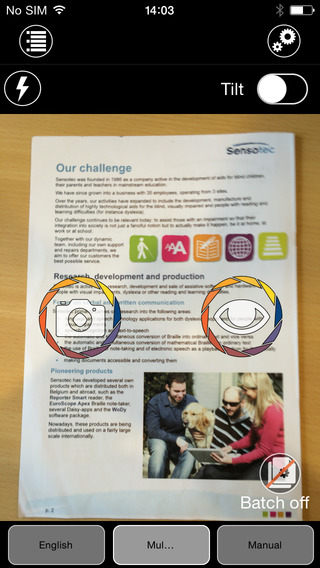
Once a document is properly framed, only one more step is necessary to start reading the document. Simply press the take picture button and within seconds the app will recognize the text within the document using optical character recognition (OCR) and begin reading it with text-to-speech. No need to crop or adjust the image, once the picture is taken the app does all the work. All recognition is done locally on the device so personal data is never transmitted over the internet.

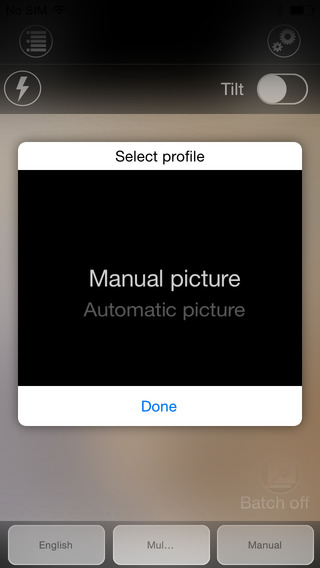
The KNFB Reader app has a number of features that help users capture images of text. For users who are blind and visually impaired the app offers a "field of view report" which offers spoken feedback to help frame the document in the view finder. This feature will let a users know how many corners of the document are within the field of view and if the document is tilted. In addition, the app offers automatic picture taking mode which will automatically snap a picture of a document when it is properly framed.  The app also includes the ability to capture multi-page documents with batch mode. The field of view feature worked well with loose paper documents, but I did not have success using the automatic capture feature with books.

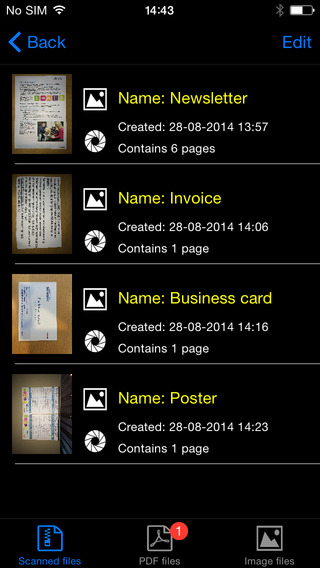
In addition to using the device's built in camera to capture images, users can also import image based PDF documents and JPG files to be recognized with the app. For example, using the "open in" feature of Google Drive will allow a user to import an image to be recognized and read with KNFB Reader.

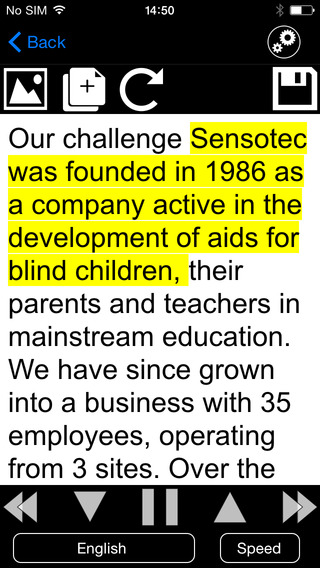
Text is can be highlighted word-by-word or line-by-line as it is being read aloud by the text-to-speech voice. Users can adjust the layout and appearance of the text and change the speaking rate of the text-to-speech voice. Only the default iOS text-to-speech voice is available, so users hoping to use another voice will have to export the text to another app. The built-in text reader also lacks the ability to highlight or annotate the document, so once again users looking for this functionality will need to export the text to a different app.

While the KNFB Reader app is faster and more accurate than competing products such as Prizmo, Prizmo does include some useful features that KNFB Reader does not. Prizmo, which is significantly less expensive, includes the ability to export PDF documents. This means a user can take a picture of a document, have the text recognized and any images on the page retained by Prizmo, so that it looks identical to the printed page. KNFB reader, by contrast strips away images, and only retains the printed text. If PDF export is an important feature to you, Prizmo may be a better option. Click here to learn more about Prizmo. 

If you are looking for a text recognition app with great speed and accuracy, I think you will be quite pleased. If The KNFB reader fits your budget, you won't be disappointed. KNFB Reader costs $100, to download the app from the App Store click here. It is compatible with the iPhone 4S and newer and the iPod touch fifth generation. Click read more below to view screen shots of the app.


Minggu, 23 Februari 2014

Launch Center Pro: Speed Up Common Actions on iOS Devices


blue icon with rocket ship in the middleLaunch Center Pro is an app for iPhone, iPad, and iPod Touch that allows users to launch apps and simple tasks directly from the app. Instead of launching Safari, navigating to the search site, and typing in your search, for instance, Launch Center Pro lets you directly search Google or Wikipedia; Launch Center Pro also can be configured  by users to set up group email, instead of having to type in the email address of each recipient.

Launch Center Pro uses a simple interface to make it easy to simplify some of your common actions and launch them quickly. I frequently text my sister "where are you?" Instead of launching the Messages app, finding my sister's contact, and then typing the message, I created a Launch Center Pro action that sends a text to my sister saying, "where are you?" Now, when I want to text my sister, I just touch the icon for this action and a text saying "where are you?" is on its way to my sister.
,
Creating actions is easy with the built in action composer which gives users the ability to pick pre-made actions for apps they already have installed on their device. The action composer also allows users to customize the icon of the action to make it easier to find.

Launch Center Pro works with a number of apps, but support for more useful actions among third party apps is hit or miss. Some apps such as Prizmo integrate very well with the app allowing you to easily launch actions, but other apps such as Nike+ Running can be opened, but not further interacted with. It would be nice to be able to start a new run in Nike+ via Launch Center, but actions like that requires the developer to build special support for Launch Center Pro into their apps. Click here to view a list of the apps currently supporting Launch Center Pro.

I see Launch Center Pro as a great app for first time iOS users, and other individuals who struggle performing sequential functions. Launch Center Pro can make it easier for first time iOS users learn to use their devices. Instead of learning how to search Google, Wikipedia, Yelp, and Google Maps individually a simple search menu could be made with quick links to search all those services. In terms of accessibility for the blind and visually impaired, Launch Center Pro works well with VoiceOver and supports the Fleksy keyboard which is accessible.

Launch Center Pro costs $4.99 for the iPhone version and $7.99 for the iPad version. Click here to view the app for iPhone and click here to view the app for iPad. Click read more below to view screen shots of Launch Center Pro in action.


App was provided complimentary to reviewer for review 

Jumat, 20 September 2013

New in iOS 7: Redeem iTunes Gift Cards with the Camera


Apple’s new mobile operating system for iPhone, iPad, and iPod Touch includes the ability to redeem iTunes gift cards with the camera instead of manually typing long codes. To redeem a gift card with the camera go to the iTunes Store, App Store, or iBooks Store and hit redeem at the bottom of the featured page. Then choose to redeem the gift card with the camera. You can use either the front facing or rear facing camera. To redeem the gift card just point the camera at the back of the gift card and the code is automatically redeemed. This new feature makes it possible for the blind and visually impaired to redeem gift cards without sighted assistance. Also, iOS 7 eliminates the need for sighted users to type in long and complicated codes. iOS 7 is available now for iPhone, iPad, and iPod Touch.

Senin, 08 Oktober 2012

iOS 6: VoiceOver Compatiblity with Maps, Assistive Touch, and Zoom


iOS 6 the latest operating system for iPhone, iPad and iPod Touch includes new VoiceOver enhancements. The enhancements allow VoiceOver users to use zoom, Assistive Touch and maps simultaneously with VoiceOver. These new features are built into iOS 6 so there are no additional downloads. Watch the above video to learn more about VoiceOver improvements in iOS 6.

Rabu, 12 September 2012

iOS 6 To Be Released on September 19th With New Accessibility Features

iOS 6 To Be Released on September 19th With New Accessibility Features


Today, Apple announced that iOS 6, the software that runs iPhone, iPad and iPod Touch, will be released on September 19th. The free software update will include new accessibility features such as Guided Access, Speak Selection with highlighting and improved Siri. Click here to learn more about Guided Access. iOS 6 will also include Made For iPhone Hearing Aids which allow hearing aid users to better use the iPhone. Along with accessibility improvements iOS 6 includes an updated maps app and more.

Click read more below to view more images of iOS 6 from Apple.


Rabu, 08 Agustus 2012

BlackBerry Screen Reader Review


The BlackBerry Screen Reader is designed to make BlackBerry phones accessible to the visually impaired. BlackBerry Screen Reader is compatible with the BlackBerry Curve 9350, 9360, 9370, 9320 and 9220.

Installation is complicated and may require the assistance of a sighted person. Unfortutantly, BlackBerry Screen Reader is not built into the phone. There are two methods for installing the BlackBerry Screen Reader. The first method is to visit this webpage from your BlackBerry. Another option for installation is to plug the BlackBerry into your computer and then install the Screen Reader. Connecting your BlackBerry device to your computer is the most accessible option for installation.

Features
  • Physical Keyboard
  • Keyboard Shortcuts
  • Speak Everything On Screen
  • Free For Compatible BlackBerry Devices

Once installed  you will be greeted with a solid Screen Reader that makes the BlackBerry accessible. The visually impaired user benefits from the numerous physical buttons, including a full physical keyboard. Five buttons on the device are less tactile. These buttons include the answer, end, menu, back and end/off. While these buttons are flush with the device they are still used for the visually impaired once there location has been memorized. To be clear these buttons depress when pressed. The physical keyboard makes it possible to type eyes-free. Once you move away from the physical buttons and start navigating the screen, a text-to-speech voice begins speaking everything under your cursor. The BlackBerry I tested had a very loud speaker that made hearing the voice easy. To navigate the cursor you can use the trackpad. The trackpad is fairly sensitive so it may be best to turn down the sensitivity. Also, I found it helpful to turn on audible clicks when the cursor moves from one object to another. The BlackBerry Screen Reader also excels with the use of keyboard shortcuts. For example you can press a key combination to speak the time. Users can change the speech rate, verbosity and pitch.

Overall the BlackBerry Screen Reader is a solid screen reader that makes the BlackBerry accessible for visually impaired users. It is not as polished as other mobile screen readers such as Apple's VoiceOver. BlackBerry Screen Reader may not work with third party apps. Some work could be done in streamlining operations and stability. Also, the screen reader should be built into the BlackBerry from the start. Click read more below to view screenshots of the BlackBerry Screen Reader.


Device Provided Complimentary To Reviewer 


Rabu, 01 Agustus 2012

Prizmo Vs. TextDetective OCR iPhone App Challange


Prizmo and TextDetective are optical charactor recognition (OCR) apps for the iPhone. These apps use the iPhone camera to take a picture of a document and then convert the text on the paper to digital text. Because the apps rely on the iPhone camera they work best on the iPhone 4S. The apps were compared using a complex image with multiple images and columns. Both apps were used in a room with good lighting. Watch the video above to learn more about each of the apps.

Prizmo costs $9.99 in the App Store. Click here to download Prizmo. Prizmo is the fastest most accurate user friendly OCR app that I have ever tested. It is designed for sighted users. It allows you to crop and edit the picture before you start the OCR process. Once the text has been recognized you can read it using text-to-speech, email it or copy the text. It is important to note that users with visual impairments may have a hard time taking pictures of the documents they want to OCR. It also is impossible for a visually impaired user to crop the document to improve the accuracy. That being said for sighted users very easy to use.

TextDetective costs $1.99 for a limited time. Click here to download TextDetective. TextDetective is designed for people with visual impairments. The app is designed to make taking a picture of a document easy for the visually impair. In my tests I had a hard time taking a clear picture of a whole document. I could successfully capture a clear picture of one or two paragraphs. TextDetective was less accurate and slower than Prizmo. One problem I found is that TextDetective only works in landscape orientation but most documents are in portrait orientation. The orientation of the app makes it difficult to  take a crisp picture of the page. In all for only $1.99 TextDetective may be worth a try.

blindsightabc abc
Apps Provided Complimentary To Reviewer
How To Use
  • Put the link on the
  • Generate Link box with http:// or https://
  • Use  CTRL + V  on keyboard to put the link.
  • Click Generate button to get encrypted link.
  • Click Copy URL button.
  • Done